Lookup notes for the ESP32 follow-on lessons: 3.3 V I/O, strapping pins, ADC, Wi-Fi, HTTP and JSON, MQTT, BLE, deep sleep, FreeRTOS and OTA. The Uno language and I/O notes are on the Theory Reference.
ESP32 guide (Units G-I)
Lookup notes for the ESP32 track. Practical wiring and full sketches stay in the ESP32 follow-on lessons. Classic ESP32 DevKit / ESP32 Dev Module is the default lab board unless a lesson says otherwise.
note
ESP32 3.3 V I/O safety
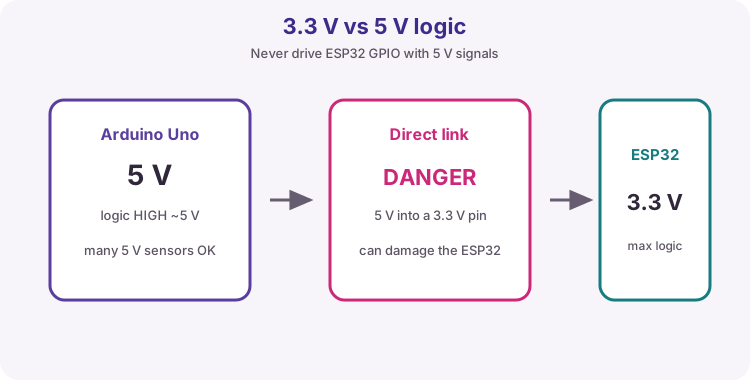
ESP32-family GPIO is 3.3 V class. Do not drive an ESP32 input from a 5 V Uno output or a 5 V sensor signal without level shifting. Many modules accept 5 V on USB or VIN while the chip I/O remains 3.3 V.
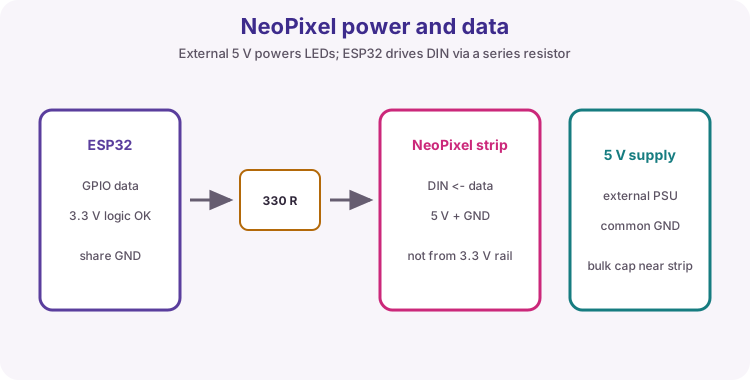
Design LED pin current around 12 mA or less. NeoPixel / WS2812 strips need an external 5 V supply and common GND for more than a few LEDs - do not power a long string from the ESP32 3.3 V pin.
Same IDE idea, different voltage class.table
Strapping pins and boot
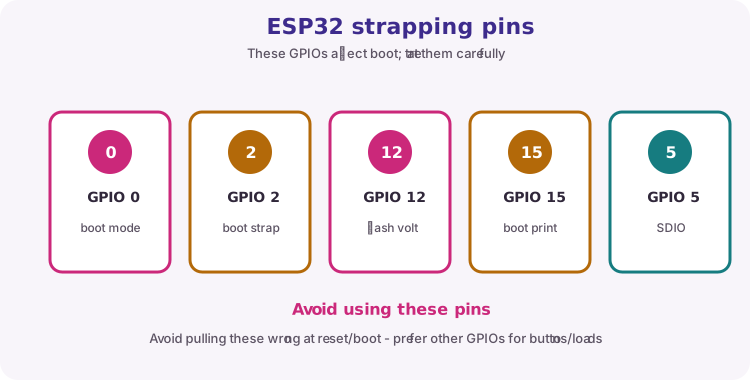
Some GPIOs are sampled at reset to select boot mode. Avoid using them for buttons that might be held during reset, or learn the safe idle level for your board. Exact sets vary by chip; classic ESP32 commonly cares about GPIO 0, 2, 12 and 15.
Check your module pinout before committing a wire.
Topic
Course habit
GPIO 0
Often BOOT - leave free or know pull state
GPIO 2
Often onboard LED - OK for blink; watch boot
GPIO 12 / 15
Strapping on classic ESP32 - prefer other pins for critical inputs
ADC1 pins
Prefer ADC1 (e.g. GPIO 34-39 on classic) when Wi-Fi is on
note
ESP32 ADC notes
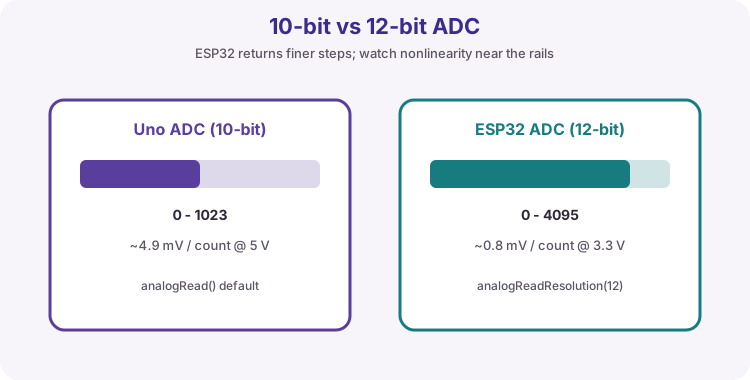
Arduino-ESP32 often exposes 12-bit analogRead (0-4095). That is not the same scale as Uno 0-1023. The ADC is useful for pots and relative sensing; it is not a precision lab meter. Attenuation settings change the usable voltage range. Nonlinearity is worse near the rails.
Classic ESP32 DAC exists on GPIO 25 and 26. Many C-series chips have no DAC - check the datasheet.
More counts, still not a calibrated instrument.note
WiFi Station and Access Point
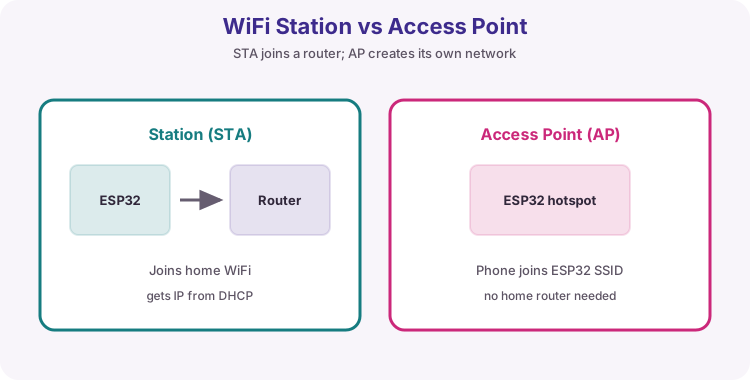
Station (STA): the ESP32 joins your router. After WL_CONNECTED, WiFi.localIP() is the LAN address (usually from DHCP); gatewayIP() is typically the router; RSSI() is signal strength in dBm (more negative is weaker).
Access Point (AP / SoftAP): the ESP32 creates a hotspot for phones to join (handy for first-time setup). softAPIP() is often 192.168.4.1 - a different address from the STA LAN IP.
Classic ESP32 is 2.4 GHz only. Use Serial.begin(115200). Keep WiFi credentials as placeholders - never commit real passwords to shared repos.
STA joins a router. AP is its own hotspot.table
HTTP request and response
HTTP is the text protocol behind browsers and many APIs. A request has a method and path; a response has a status code and often a body. ESP32 Lesson 09 is HTTP server; ESP32 Lesson 10 is HTTP client.
Piece
Course habit
GET
Read a page or API document
POST
Send a body (form fields or JSON) to create/update
JSON (JavaScript Object Notation) is structured text used by almost every web API and many MQTT payloads. If you can read the braces and quotes, you can invent your own documents for a room node, weather reply or heater command.
ArduinoJson by Benoit Blanchon (JsonDocument in v7) turns that text into values your sketch can test. Workflow: HTTP status 200 (or a known MQTT string) -> deserializeJson -> check DeserializationError -> read fields with optional | defaults -> then act. Print the raw body when a path looks wrong.
The six JSON value types
"text"string
Always double quotes. Keys are strings too. Single quotes are invalid JSON.
21.5number
Integer or decimal. No units in the value - put units in the key name (temp_c).
true / falseboolean
Lowercase only. Not True or TRUE.
nullnull
Means no value. Different from 0 or "".
{ ... }object
Unordered set of "key": value pairs, comma-separated. Nested objects are normal.
[ ... ]array
Ordered list of values (any type). Index from 0.
Rules that break parsers
,Trailing comma
No comma after the last item in an object or array.
'Quotes
Keys and strings must use ". Comments (//) are not allowed in strict JSON.
NaNSpecial numbers
Avoid NaN / Infinity - many parsers reject them. Send null or omit the field.
UTF-8Encoding
Stick to plain UTF-8 text. Escape newlines inside strings as \n.
Path in the example
ArduinoJson read
Result type
room
doc["room"]
string
level
doc["level"] | 0
number (with default)
alert
doc["alert"] | false
boolean
sensor.temp_c
doc["sensor"]["temp_c"]
number (nested)
tags[0]
doc["tags"][0]
first array string
Tip: Course labs stay on plain HTTP JSON where possible so certificates do not hide the structure lesson.
Objects hold named fields. Arrays hold ordered items. Mix them freely: an object can contain an array of objects (weather forecasts, slide decks, RFID events).
Zero-based indexes: the first element is [0]. Missing keys or out-of-range indexes yield null / empty - use | defaults so your sketch does not act on garbage.
Write your own JSON
// Hand-built (small)String body = "{\"temp\":";
body += String(t, 1);
body += ",\"heater\":";
body += heaterOn ? "true" : "false";
body += "}";
// -> {"temp":21.5,"heater":false}// ArduinoJson build (safer for growth)
JsonDocument out;
out["temp"] = t;
out["heater"] = heaterOn;
serializeJson(out, Serial);
Design the document before the sketch. Pick short stable key names, one clear meaning each, and nest only when a group of fields belongs together (sensor, wifi, alarm).
Building text by hand is fine for small payloads: start with {, add "key": value pairs with commas, close with }. For larger documents, prefer ArduinoJson serializeJson so commas and quotes stay valid.
Tip: Match names exactly on publisher and subscriber - temp and Temp are different keys.
Parse checklist
1) Confirm the body is JSON (not an HTML error page). 2) deserializeJson into a JsonDocument. 3) If error, print the error and the raw body. 4) Read only the fields you need with | defaults. 5) Then drive GPIO / Serial / MQTT.
Mistake
Fix
Parse before HTTP 200
Check status first
Wrong nesting path
Print body; walk keys one level at a time
Expecting a number, got a string
API may send "21.5" - read as string or use as<float>() carefully
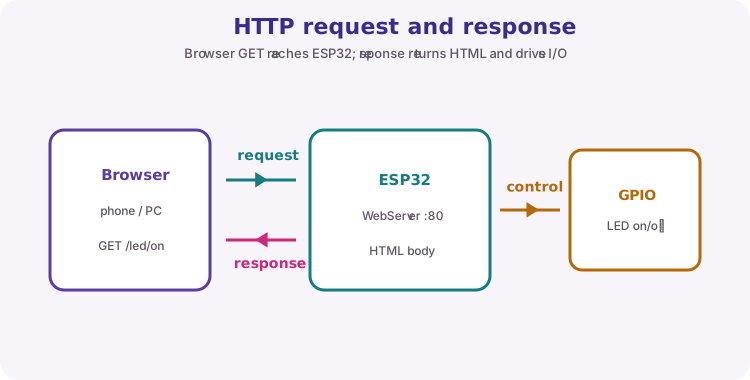
WebServer on port 80 maps URL paths to handler functions (server.on). loop must call server.handleClient() often - a long delay blocks the page.
A 303 redirect after an action (for example /led/on) sends the browser back to / so the page refreshes. Raw string literals R"=====( ... )=====" make HTML easier to embed without escaping every quote.
Request path selects the handler; response can be HTML or a redirect.table
MQTT, BLE and deep sleep
Quick map of Units H-I topics. Prefer the dedicated entries below for BLE, deep sleep, FreeRTOS and OTA. MQTT topics are exact string matches; payloads are often plain text or JSON.
Topic
One-line idea
MQTT
Publish/subscribe through a broker - live updates without HTTP polling
QoS / retain
Delivery effort and last-message memory on the broker (overview in ESP32 Lesson 11)
BLE
Phone talks to a GATT service/characteristic - prefer BLE over Classic SPP
Deep sleep
Timer or GPIO wake; RTC memory can keep a small counter
OTA
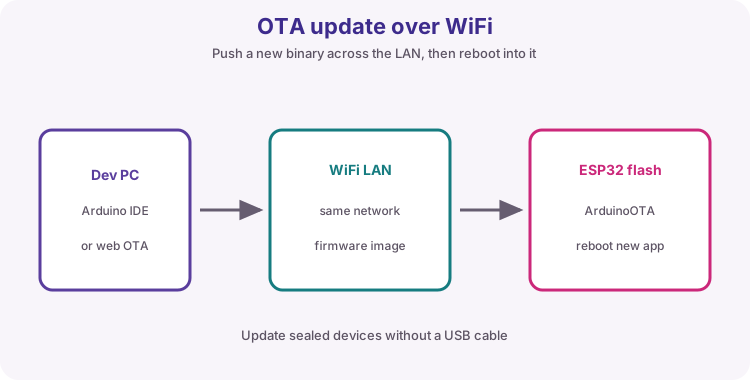
ArduinoOTA updates firmware over Wi-Fi after first USB upload
note
BLE GATT essentials
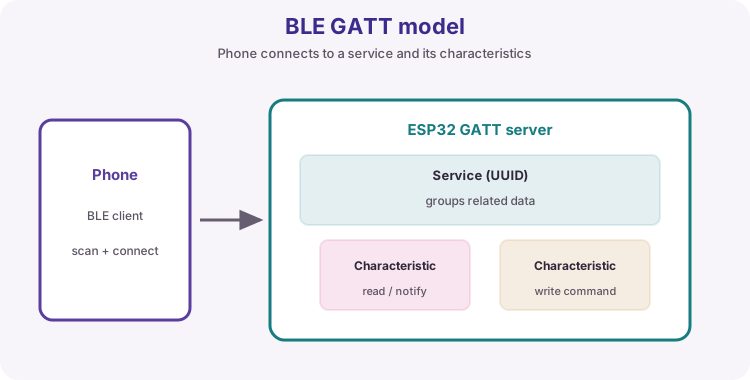
BLE peripheral advertises; phone (central) connects and uses GATT. A service groups characteristics; each characteristic is a readable/writable value identified by a UUID. Properties include READ, WRITE and NOTIFY. Labs often use custom 128-bit UUIDs.
Prefer BLE for short-range phone control without a router. Prefer Wi-Fi for LAN browsers, MQTT and cloud HTTP. Classic Bluetooth is legacy for new ESP32 labs. ESP32-P4 needs a companion radio for BLE.
Advertise, connect, write a characteristic, drive GPIO.
Term
Role
Peripheral / server
ESP32 advertising GATT
Central / client
Phone app
Service
Group of characteristics
Characteristic
The value you read or write
NOTIFY
Server pushes updates to the phone
note
Deep sleep and wake
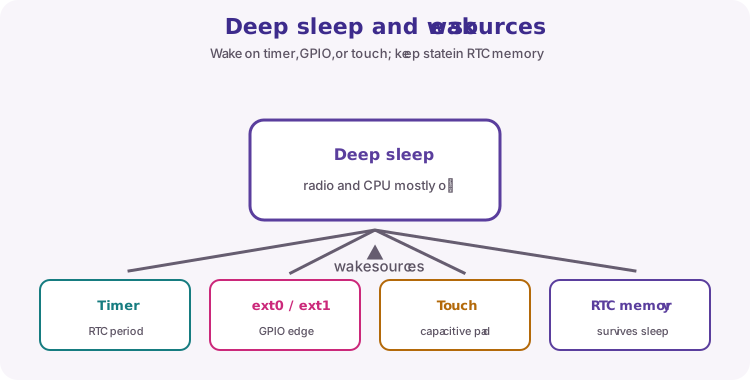
Deep sleep powers down most of the chip; normal SRAM is lost and wake typically restarts into setup(). Arm a timer with esp_sleep_enable_timer_wakeup(us) then call esp_deep_sleep_start(). Other wake sources include EXT0/EXT1 GPIOs and touch on supported pins.
RTC_DATA_ATTR keeps a variable across deep sleep but not across power loss - use Preferences/NVS for durable settings. DevKit USB-UART chips and LEDs can hide true sleep current on a USB meter.
Duty-cycle: wake, work, sleep.note
FreeRTOS tasks on ESP32
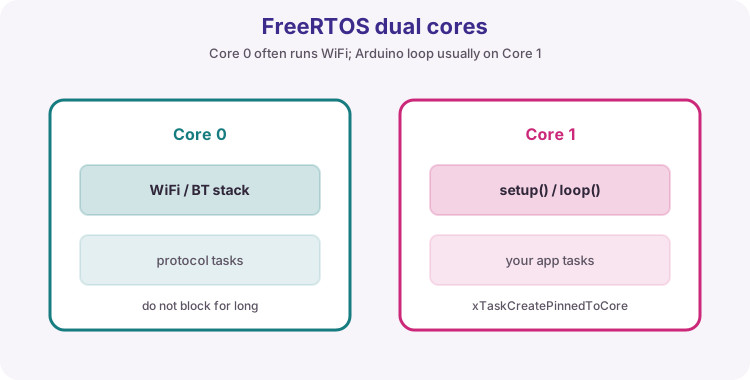
Arduino-ESP32 runs on FreeRTOS. setup()/loop() usually run on core 1; WiFi/BT work often uses core 0. Create workers with xTaskCreatePinnedToCore; wait with vTaskDelay(pdMS_TO_TICKS(ms)). Start stack sizes around 2048 and raise if the board reboots under load.
Shared globals without protection cause race conditions - use queues or mutexes when tasks share data. Do not add a task for every blink; millis in one loop is often enough.
ArduinoOTA: after STA connect, call ArduinoOTA.begin() and ArduinoOTA.handle() often in loop. First flash is USB; later uploads can use Tools → Port → network hostname. Set a unique hostname and an OTA password outside trusted lab LANs. Keep USB recovery available.
HTTP OTA (device pulls an image URL) is the usual field-fleet pattern - different from IDE ArduinoOTA.
USB once, then network uploads with handle() kept alive.note
NeoPixel / WS2812 power
Addressable LEDs chain data (DIN to DOUT). Full white can draw about 60 mA per LED - budget the 5 V supply. Share GND with the ESP32. Put a series resistor on the data line (~330-470 ohm) and a bulk capacitor on 5 V near the strip. Call show() after you change pixel colours. Library for this course: Adafruit NeoPixel.
External 5 V for the strip; common GND; data from a GPIO.