
Buttons, Pull-ups & Debounce
Read a push button with INPUT_PULLUP, act on the press rather than the level, and stop contact bounce from counting one press as four.
Why a pressed button reads LOW
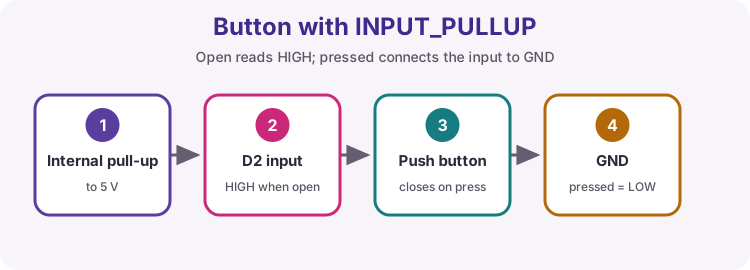
A push button on its own leaves the pin floating - connected to nothing, reading random HIGH and LOW values. pinMode(pin, INPUT_PULLUP) switches on a resistor inside the chip that gently holds the pin HIGH.
The button then connects the pin to GND, so:
- not pressed: HIGH
- pressed: LOW
That feels backwards at first, and it is worth saying out loud every time you read a button.
Reading the button
Press Run, then hold the button on the virtual board and watch the Serial Monitor change. Let go and it goes back to released.
released
released
released
LED follows the button
Light the onboard LED while the button is held, and switch it off when the button is released. The test presses the button at 300 ms and lets go at 900 ms.
Act on the change, not the level
loop() runs thousands of times a second, so while you hold a button the condition digitalRead(BUTTON) == LOW is true thousands of times. Counting there would count thousands of presses.
What you want is the moment it changes: it is LOW now and it was HIGH last time round. Remember the previous reading in a variable and compare:
if (now == LOW && last == HIGH) { ... }- a new press- then
last = now;at the end of every pass
Count the presses
Print Presses: 1, Presses: 2, and so on - one line per press, not per loop. The previous reading is kept in lastButton for you.
Presses: 1
Presses: 2
Presses: 3
One press, one toggle
Make the button work like a light switch: each press flips the LED on or off, and it stays that way when you let go. The test presses three times.
Switch bounce
Button contacts are springy metal. For a few milliseconds after they touch they make and break contact several times, so one press looks like several presses to code that runs thousands of times a second.
The cure is to wait for the reading to hold still. Remember when the raw reading last changed, and only believe it once it has been steady for, say, 20 ms:
- raw reading changed? remember the time and nothing else
- steady for 20 ms and different from the value you trust? that is a real change
The next exercise feeds your sketch real chatter, so the version without debouncing fails.
Debounce the button
This counter works with clean presses, but the test presses the button the way real contacts behave: a burst of chatter, then a steady press. It counts four presses instead of two.
Rewrite it so only readings that have been steady for 20 ms count. Both tests must pass - the bouncy one and the clean one.
Presses: 1
Presses: 2
Short press or long press?
Many devices do two jobs with one button. When the button is released, print short if it was held for less than 800 ms and long if it was held for 800 ms or more.
Note when the press starts, and work out how long it lasted when it ends.
short
long
Try it on a real Uno
Wire a push button from pin 2 to GND - no resistor needed, INPUT_PULLUP provides it. Upload One press, one toggle and press it twenty times: if the LED sometimes ignores a press or flips twice, you have just met contact bounce on real hardware.
Then upload your debounced version and try again.