
Analogue Inputs
Read a knob or sensor with analogRead, turn 0-1023 into volts and percent, switch on a threshold without chattering, and average away the noise.
From volts to numbers
analogRead(A0) measures the voltage on an analogue pin and gives a whole number from 0 to 1023 (10 bits). 0 means 0 V and 1023 means 5 V, so each step is about 4.9 mV.
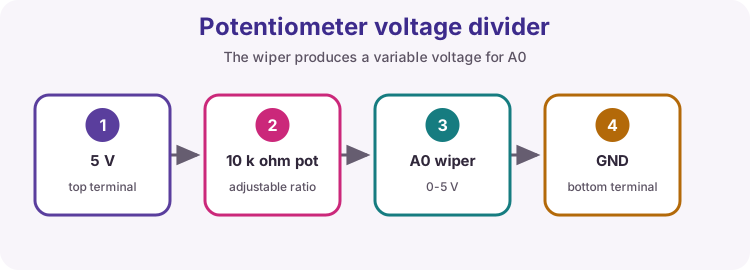
A potentiometer is a voltage divider you can turn: one end to 5 V, the other to GND, the middle wiper to A0. Turn it and the wiper voltage - and the reading - sweeps between the two ends.
Drag the slider on the virtual board while a sketch runs to "turn the knob".
Reading the knob
Press Run, then drag the potentiometer slider and watch both numbers move.
reading 512  volts 2.50
reading 512  volts 2.50
Print the reading
Read the potentiometer on A0 and print it as A0 = 512, five times a second. The test turns the knob while your sketch runs, so read it every pass - do not store it once.
A0 = 512
A0 = 512
A0 = 512
Knob as a percentage
0 to 1023 means little to a person. Print the knob position as a percentage instead: Knob: 50 %, twice a second. map(value, 0, 1023, 0, 100) does the scaling.
Knob: 50 %
Dark switch
An LDR divider on A0 reads low when it is dark. Switch the onboard LED on while the reading is below 300, and off otherwise. The test dims and brightens the light for you.
Thresholds that chatter
A single threshold is trouble when the reading sits right on it. Noise of a few counts flips the output on and off dozens of times a second - you can hear it on a relay.
The cure is hysteresis: two thresholds with a gap between them. Switch on when it gets properly dark, switch off when it gets properly light, and in between leave things alone. It is the same dead band as the thermostat in Chapter 3.
Add hysteresis
Give the dark switch a dead band:
- below 300: switch the LED on
- above 400: switch it off
- between 300 and 400: leave it as it is
lampOn remembers the current state. The test parks the reading in the middle band twice, and the LED must not move then.
Average ten readings
A single analogRead jitters by a count or two. Take ten readings 5 ms apart in setup(), add them up and print the average as Average: 600.
Average: 600
What is the sensor's resistance?
The sensor sits in a divider: 10 kΩ from 5 V down to A0, and the sensor from A0 to GND. Its resistance is
R = 10000 × reading / (1023 − reading)
Print it as Reading 512 = 10019 ohm. Careful: 10000 × 512 does not fit in an int.
Reading 512 = 10019 ohm
Try it on a real Uno
Wire a 10 kΩ potentiometer: outer legs to 5 V and GND, wiper to A0. Upload Knob as a percentage and turn it slowly through the whole range.
Then swap the pot for an LDR and a 10 kΩ resistor as in Lesson 20, upload Add hysteresis, and find the two thresholds that suit your room by printing the reading while you cover the sensor.