
Variables & Types
Store values in well-named variables, calculate with them, choose the right Uno type, and see what happens when a number no longer fits.
What you will practise
A variable is a named box for a value. Every variable has a type (what kind of value), a name and a value. On the Uno the type also decides how big the box is - and a value that does not fit wraps around to a strange number.
In this chapter you print values to the Serial Monitor, calculate with whole numbers and decimals, and hunt down two classic type bugs. The tests run your sketch on a simulated Arduino Uno, so int really is 16-bit, exactly like the real board.
Declaring and printing variables
Each variable is declared above setup() with a type, a name and a starting value. Serial.print shows a value and stays on the same line; Serial.println ends the line. Press Run and watch the Serial Monitor.
ledPin = 13
voltage = 4.75
ready = 1
grade = A
- A
boolprints as 1 (true) or 0 (false). - A
charprints as the character itself, not a number. - A
floatprints with two decimal places unless you ask for more:Serial.println(voltage, 3);
One variable, one label
Declare an int called ledPin holding 13, then print it after the label LED pin: .
Use Serial.print for the label and Serial.println for the value.
LED pin: 13
Board passport
Now four variables. Declare them above setup():
boardName, aStringholding"Uno"pinCount, anintholding20clockMHz, abyteholding16supplyVoltage, afloatholding5.0
Then print them so the Serial Monitor shows exactly the sample output.
Board: Uno
Pins: 20
Clock MHz: 16
Voltage: 5.00
Choosing a type on the Uno
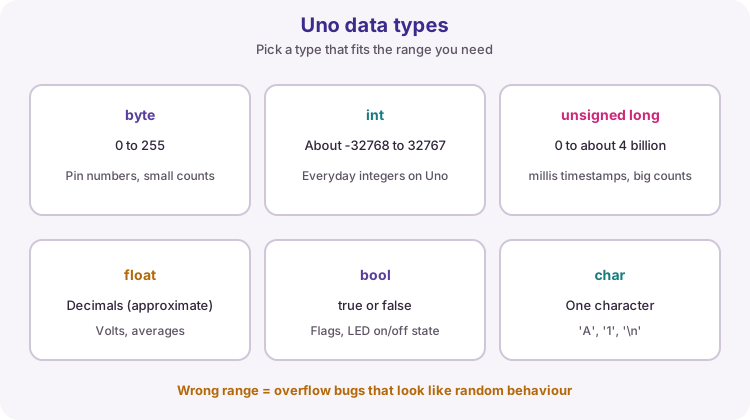
The Uno's ATmega328P is an 8-bit chip, so its types are smaller than on a PC. Pick the smallest type that always fits the value:
| Type | Size | Range | Typical use |
|---|---|---|---|
| byte | 1 byte | 0 to 255 | pin numbers, small counts |
| int | 2 bytes | -32768 to 32767 | everyday whole numbers |
| unsigned int | 2 bytes | 0 to 65535 | counts that are never negative |
| long | 4 bytes | about -2.1 to 2.1 billion | big whole numbers |
| unsigned long | 4 bytes | 0 to 4294967295 | millis() times, long counters |
| float | 4 bytes | about 7 significant digits | volts, temperatures, averages |
| bool | 1 byte | true / false | flags such as ledOn |
| char | 1 byte | one character | letters, 'A' |
Counting with the right type
This is the Lesson 04 sketch. flashCount is an unsigned long because it keeps growing for as long as the board runs. Run it and watch the virtual LED and the count together.
flashCount = 1
flashCount = 2
flashCount = 3
Calculate with variables
red and blue hold two counts of parts. Print their total, their difference (red minus blue) and their product, each after its label.
Calculate with the variables - the tests try other numbers.
Total: 17
Difference: 7
Product: 60
Whole numbers and decimals
When both sides of / are whole numbers, C++ does integer division: the answer is a whole number and the remainder is thrown away. 7 / 2 is 3, not 3.5.
If either side is a decimal, the calculation is done with decimals: 7 / 2.0 is 3.5. Storing the result in a float afterwards is too late - the decimals were already lost.
Integer division in action
Run this and compare each line with the code that printed it.
3
3.50
1
69
69.80
Celsius to Fahrenheit
celsius holds a temperature. Declare a float called fahrenheit, calculate it with F = C × 9 / 5 + 32, and print one line like the sample. The tests try other temperatures, including negative ones.
21.50 C = 70.70 F
Fix the average
This sketch should print the average of a, b and c with two decimals, but it prints Average: 7.00 instead of Average: 7.67. Find out why and fix it. Keep the three variables.
Average: 7.67
Dividing with a remainder
Two operators work together on whole numbers:
/says how many whole times one number fits into another:17 / 5is3.%says what is left over:17 % 5is2.
Together they split a number into parts - 17 sweets shared between 5 children is 3 each with 2 left over. The same pair turns seconds into minutes, or milliseconds into seconds.
Share out the sweets
sweets are shared equally between children. Print how many each child gets, and how many are left over.
Each gets: 3
Left over: 2
Seconds to hours, minutes and seconds
totalSeconds holds a time. Work out the whole hours, minutes and seconds, and print one line like the sample.
There are 3600 seconds in an hour and 60 in a minute. Use / and % as in the last exercise.
3725 s = 1 h 2 min 5 s
Deeper When a number no longer fits
An int on the Uno has 16 bits, so its largest value is 32767. Add 1 and it wraps around to -32768, like a car odometer rolling over. Unsigned types wrap the other way: a byte at 0 minus 1 becomes 255.
The compiler does the same with numbers you type: 60 * 1000 is calculated as an int (both numbers are ints) and overflows before it is stored - even if you store it in an unsigned long. Adding L or UL to a number makes it a 32-bit long or unsigned long.
Watching an int overflow
Run this and look at what happens after 32767.
32765
32766
32767
-32768
-32767
The 60 * 1000 bug
This sketch should say that one minute is 60000 ms and one hour is 3600000 ms, but the numbers are wildly wrong. Fix the two calculations so they are done in a 32-bit type. Keep them as calculations - do not type 60000 or 3600000.
One minute is 60000 ms
One hour is 3600000 ms
From analogRead to volts
reading holds what analogRead() gives on an Uno: a whole number from 0 to 1023, where 1023 means 5 V. Declare a float called volts, work out the voltage, and print the line in the sample with three decimals.
Two of the obvious ways give 0.000. The hints explain why.
Reading 512 = 2.502 V
Try it on a real Uno
Download your solution to Seconds to hours, minutes and seconds with the Download .ino button, open it in the Arduino IDE and upload it. Set the Serial Monitor to 9600 baud: the output should match the simulator exactly.
Then change totalSeconds to 100000 and predict the output before you upload.