
08. Functions: Naming & Reusing Tasks
Package repeated work behind a clear name, pass values in with parameters, and hand results back with return.
Learning outcomes
- Identify the return type, name, parameters and body of a function
- Write void helper functions that act on hardware
- Write functions that return a value and use the result in an expression or decision
- Explain that parameters are copies and local variables disappear when the function ends
- Split a long loop() into named steps that read like a plan
Parts and preparation
Arduino Uno, four LEDs, four 330 ohm resistors, breadboard and jumper wires - the same circuit as Lesson 07.
Before power: inspect wiring, confirm supply voltage and ensure all connected circuits share GND.
Why functions matter
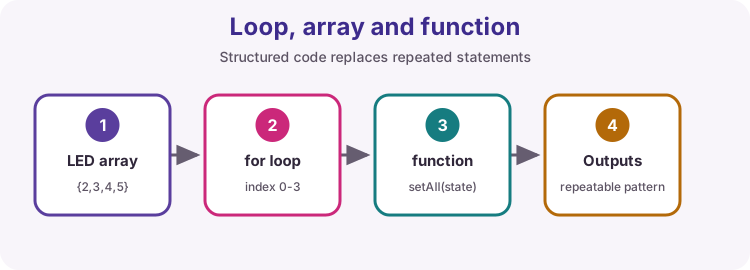
In Lesson 07 a for loop removed repeated lines. Functions remove repeated ideas. When the same job appears in several places - switch every LED off, flash a warning, convert a reading - give it a name and write it once.
A good function name turns loop() into something you can read aloud: chase forwards, chase backwards, flash all. When a pin or a timing changes, you edit one function and every caller follows.
Parts of a function
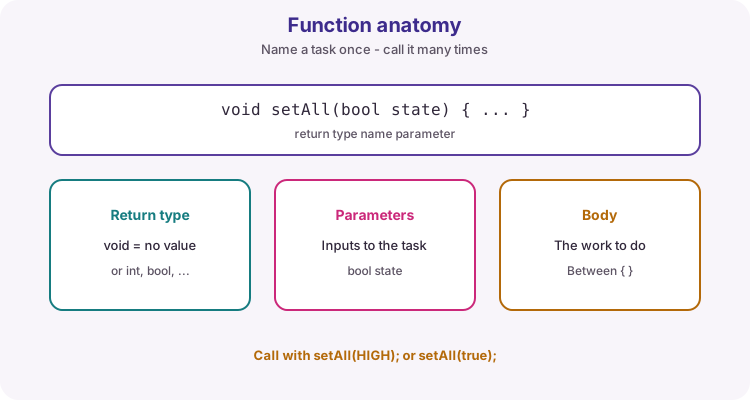
Every function has four parts. The return type says what comes back (void means nothing). The name says what it does. The parameter list names the values it needs. The body, inside braces, does the work.
Define the function outside setup() and loop() - never inside another function. Call it by writing its name with values in the brackets: setAll(HIGH);
| Part | In void setAll(bool state) | Meaning |
|---|---|---|
| Return type | void | Nothing is returned |
| Name | setAll | Verb that says what happens |
| Parameters | bool state | One value the caller must supply |
| Body | { ... } | Statements that run on each call |
void setAll(bool state) {
  for (byte i = 0; i < ledCount; i++) {
    digitalWrite(leds[i], state);
  }
}

// Called from loop():
setAll(HIGH);
setAll(LOW);
void helpers act on hardware
Most Uno helper functions do something physical and return nothing: set outputs, beep, print a status line. Parameters make one function cover several cases.
chase(bool forward, int stepMs) runs the same four-LED chase in either direction at any speed. Inside, an if chooses the index, so one loop serves both directions.
void chase(bool forward, int stepMs) {
  for (byte i = 0; i < ledCount; i++) {
    byte index = i;
    if (!forward) {
      index = ledCount - 1 - i;
    }
    digitalWrite(leds[index], HIGH);
    delay(stepMs);
    digitalWrite(leds[index], LOW);
  }
}
Returning a value
Replace void with a type when the function should hand back a result. return ends the function immediately and sends the value to the caller, so the call can sit anywhere that value fits: in an assignment, a Serial.print or an if.
Keep calculations like this free of hardware so they are easy to test - Code Along checks exactly this kind of function by calling it with known values.
| Function | Returns | Typical call |
|---|---|---|
| int stepTime(byte level) | Milliseconds for this level | int ms = stepTime(3); |
| float countsToVolts(int counts) | Voltage from an ADC count | Serial.println(countsToVolts(512)); |
| bool isPressed(byte pin) | true while held (active-low) | if (isPressed(2)) { ... } |
int stepTime(byte level) {
  return 400 - level * 50;   // level 0 -> 400 ms, level 5 -> 150 ms
}

bool isPressed(byte pin) {
  return digitalRead(pin) == LOW;   // INPUT_PULLUP: pressed reads LOW
}
Parameters are copies; locals are temporary
A parameter receives a copy of the caller's value. Changing it inside the function does not change the caller's variable.
Variables declared inside a function are local: they are created on each call and destroyed when it returns. If a value must survive between calls - a counter, a timestamp, the last button state - declare it globally (outside every function) or pass it back with return.
| Where it is declared | Who can use it | Lifetime |
|---|---|---|
| Outside all functions (global) | Every function | Whole time the board runs |
| Parameter list | That function only | One call |
| Inside the function body | That function only | One call |
Make loop() read like a plan
Large sketches stay manageable when loop() is a short list of named steps. Each step becomes a function with one job. The integration projects and assessments later in the course use exactly this shape: read inputs, decide, update outputs, report.
If you cannot name a function without the word 'and', it is probably doing two jobs - split it.
void loop() {
  readInputs();      // buttons and sensors into global variables
  updateState();     // decisions only - no pins touched here
  driveOutputs();    // LEDs, buzzer, motor
  reportStatus();    // Serial or LCD, only when something changed
}
What the worked sketch practises
setup() configures the four LED pins. loop() runs six rounds: stepTime() returns a shorter delay each round, chase() runs forwards and backwards at that speed, and Serial reports the timing. setAll() then flashes every LED together.
The chase still uses delay() so the pattern is easy to follow. Lesson 11 shows how to keep a sketch responsive while patterns run.
Wiring and safe build sequence
- D2 -> 330 ohm -> LED anode; cathode -> GND
- D3 -> 330 ohm -> LED anode; cathode -> GND
- D4 -> 330 ohm -> LED anode; cathode -> GND
- D5 -> 330 ohm -> LED anode; cathode -> GND
- Same four-LED row as the loops lesson - no rewiring needed
Worked sketch
Download .ino sketchconst byte leds[] = {2, 3, 4, 5};
const byte ledCount = sizeof(leds) / sizeof(leds[0]);
void setAll(bool state) {
for (byte i = 0; i < ledCount; i++) {
digitalWrite(leds[i], state);
}
}
void chase(bool forward, int stepMs) {
for (byte i = 0; i < ledCount; i++) {
byte index = i;
if (!forward) {
index = ledCount - 1 - i;
}
digitalWrite(leds[index], HIGH);
delay(stepMs);
digitalWrite(leds[index], LOW);
}
}
int stepTime(byte level) {
return 400 - level * 50;
}
void setup() {
for (byte i = 0; i < ledCount; i++) {
pinMode(leds[i], OUTPUT);
}
Serial.begin(9600);
}
void loop() {
for (byte level = 0; level < 6; level++) {
int stepMs = stepTime(level);
Serial.print("Level ");
Serial.print(level);
Serial.print(": step ");
Serial.print(stepMs);
Serial.println(" ms");
chase(true, stepMs);
chase(false, stepMs);
}
setAll(HIGH);
delay(500);
setAll(LOW);
delay(500);
}How the code works
- setAll(state) and chase(forward, stepMs) are void helpers: they act on the LEDs and return nothing.
- stepTime(level) returns a value, so its call sits on the right of an assignment.
- The if inside chase() reverses the index, so one loop covers both directions.
- level and stepMs are local to loop(); leds[] and ledCount are global because every function needs them.
Test and record evidence
Practical evidence checklist
Common faults and checks
- 'was not declared in this scope' for a function: check the spelling and that it is defined outside setup() and loop().
- A function seems to do nothing: confirm you called it with brackets - chase(true, 200); not chase;.
- A counter resets on every call: it is declared inside the function. Move it to global scope.
- Backwards chase skips an LED: the reverse index must be ledCount - 1 - i, not ledCount - i.
Check your understanding
Q1. What does void mean as a return type?
Show answer
The function returns no value - it only performs an action.
Q2. If a function changes its parameter, does the caller's variable change?
Show answer
No. The parameter is a copy of the caller's value.
Q3. What happens when return runs?
Show answer
The function ends immediately and hands the value back to the caller.
Q4. Why keep a timestamp outside a function rather than inside it?
Show answer
Local variables are recreated on every call, so the value would be lost.
Q5. What is a warning sign that a function does too much?
Show answer
You cannot name it without using 'and'.