
Understand
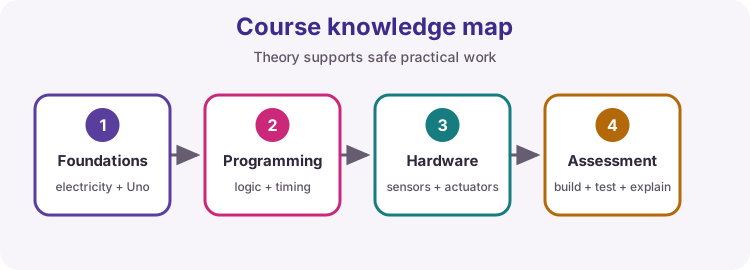
Explain electronics, Arduino hardware, C++ structures, sensors, buses and actuator drivers.
A complete 50-lesson path from safe first Uno circuits through integrated projects, then ESP32 Wi-Fi, NeoPixel, BLE and power topics.
Explain electronics, Arduino hardware, C++ structures, sensors, buses and actuator drivers.
Plan power, wire breadboards, protect outputs and verify circuits before energising.
Read inputs, make decisions, schedule tasks, organise functions and diagnose faults.
Complete projects, measurements, code explanations, practical evidence and mock assessments.
Uno, USB data cable, breadboard, jumpers, multimeter, LEDs/resistors, buttons, potentiometer and buzzer.
Servo, motor driver, stepper driver, LCD, DHT11, RTC, LDR/thermistor, ultrasonic and IR receiver.
ESP32 DevKit (ESP32 Dev Module), USB data cable, potentiometer, NeoPixel/WS2812 strip (8+ LEDs), optional 8x8 matrix, external 5 V supply for LED power, and a 3.3 V-safe habit for all wiring.
Use extra-low-voltage DC only. Never connect mains. Motors, servos and NeoPixel strings require suitable external supplies and common GND. ESP32 I/O is 3.3 V - do not feed 5 V into pins.
Safety, Electricity & Breadboards - Microcontrollers & the Arduino Uno - Arduino IDE 2 & First Upload...
Unit B - Inputs & OutputsDigital Outputs, RGB LEDs & Buzzers - Digital Inputs, Pull-Ups & Debouncing - UART Serial & Debugging...
Unit C - Actuators & DisplaysTransistors, MOSFETs & Relays - Servo Motors - DC Motors & H-Bridges...
Unit D - Sensors & BusesI2C, Address Scanning & I2C LCD - DHT11 / DHT22 Temperature & Humidity - DS1307 RTC & Formatted Text...
Unit E - College PracticePractical Fault-Finding & Multimeter Skills - Capstone 1: Environmental Monitor - Capstone 2: Clock, Alarm & Servo...
Unit F - Assessment & ReferenceCollege Practical Assessments - Theory Reference - Build Your Own Library
Unit G - ESP32 FoundationsIntroducing the ESP32 Family - Why ESP32: Architecture, Memory and When to Leave the Uno - 3.3 V Logic, Power Rails and Level Shifting...
Unit H - ESP32 WirelessWiFi Fundamentals: Station vs Access Point - Local Web Server: Control from a Browser - HTTP Client, JSON and Cloud APIs...
Unit I - ESP32 AdvancedBluetooth Low Energy Essentials - Deep Sleep and Power Management - FreeRTOS Tasks and Dual-Core Basics...
Work in order if you are new, or search for a revision topic.
Work safely with ELV DC, use Ohms law for LED resistors, and read a breadboard correctly.
2-3 hours02Unit A - FoundationsMeet the computer on the Uno: MCU vs PC, power pins, I/O groups, R3 vs R4, and optional bare-chip essentials.
2-3 hours03Unit A - FoundationsInstall Arduino IDE 2, select board and port, Verify, Upload, and blink the onboard LED.
2 hours04Unit A - FoundationsBuild readable sketches: setup/loop, named pins, suitable types, scope, and clean syntax.
3 hours05Unit A - FoundationsCalculate, compare and branch: arithmetic, = vs ==, Boolean logic, and if/else chains.
3 hours06Unit A - FoundationsRemove repetition with for/while, store related pins in arrays, and package work in functions.
4 hours07Unit B - Inputs & OutputsDrive LEDs safely, mix RGB colour, and play tones on a passive buzzer.
3 hours08Unit B - Inputs & OutputsRead stable button and switch signals.
3 hours09Unit B - Inputs & OutputsWatch your sketch over USB Serial, print useful labels, and accept simple commands.
3 hours10Unit B - Inputs & OutputsUnderstand analogue versus digital signals, measure voltage with the Uno ADC, and scale readings into engineering values.
4 hours11Unit B - Inputs & OutputsExplain PWM duty cycle with waveforms, drive brightness using analogWrite, and keep several tasks alive with millis and a simple state machine.
4 hours12Unit C - Actuators & DisplaysSwitch loads safely without overloading an Arduino pin.
4 hours13Unit C - Actuators & DisplaysCommand and safely power a closed-loop position actuator.
3 hours14Unit C - Actuators & DisplaysControl motor direction, speed and stopping safely.
4 hours15Unit C - Actuators & DisplaysProduce repeatable incremental motion.
4 hours16Unit C - Actuators & DisplaysDisplay text and live values on a character LCD.
4 hours17Unit D - Sensors & BusesShare a two-wire bus and simplify display wiring.
4 hours18Unit D - Sensors & BusesUse a library-based digital environmental sensor.
3 hours19Unit D - Sensors & BusesKeep calendar time through power loss and format it for displays.
4 hours20Unit D - Sensors & BusesUnderstand how NTC thermistors and LDRs change resistance, wire them as voltage dividers, convert ADC counts to resistance and temperature, and calibrate thresholds with hysteresis.
5 hours21Unit D - Sensors & BusesTrigger a 40 kHz burst, time the echo with pulseIn, convert microseconds to centimetres, and handle timeouts.
4 hours22Unit D - Sensors & BusesDecode modulated infrared commands and map them to actions.
3 hours23Unit D - Sensors & BusesChoose and troubleshoot common embedded communication buses.
3 hours24Unit D - Sensors & BusesRead a membrane keypad with the Keypad library and print each press on Serial.
2-3 hours25Unit E - College PracticeDiagnose circuits methodically instead of guessing.
4-5 hours26Unit E - College PracticeIntegrate DHT11, LDR, I2C LCD and a temperature alarm into one monitored system.
6-8 hours27Unit E - College PracticeShare I2C between RTC and LCD, then drive a servo and buzzer from alarm states without blocking delays.
6-8 hours28Unit E - College PracticeRun several timed tasks together without delay().
3 hours29Unit E - College PracticeUse Uno interrupts and sleep: external, pin-change, timer, USART, ADC, comparator, watchdog, and power-down wake.
3-4 hours30Unit E - College PracticeIdentify cards with an MFRC522, decide allow or deny, and append timestamped events to the Velleman VMA202 SD card.
6-8 hours31Unit F - Assessment & ReferenceComplete three practical tasks and a code-correction exercise with planning, safe build, measured evidence and printable rubrics.
8-12 hours32Unit F - Assessment & ReferenceWorld-class language, types, snprintf, I/O and circuit reference for this course. Read matching sections before practical lessons.
Reference - use as needed33Unit F - Assessment & ReferenceFull SimpleThermistor walkthrough: library folder layout, .h/.cpp class, test sketch and thermistor divider wiring.
2-3 hours34Unit G - ESP32 FoundationsMeet the ESP32 family, learn classic DevKit anatomy, install Espressif support, and complete a reliable first blink/Serial upload.
2-3 hours35Unit G - ESP32 FoundationsBuild a board passport: read chip model, flash and free heap, then decide when ESP32 earns a place over the Uno.
2-3 hours36Unit G - ESP32 FoundationsProtect ESP32 GPIO and build a safe front-panel acknowledge button with a status LED - never feed 5 V into pins.
2-3 hours37Unit G - ESP32 FoundationsLearn strapping pins and 12-bit ADC, then build a trim setpoint reader that reports LOW/MID/HIGH bands.
3 hours38Unit G - ESP32 FoundationsMap Uno I/O habits onto ESP32 and build a bench lamp dimmer with a clear brightness percent readout.
2-3 hours39Unit G - ESP32 FoundationsPower a short NeoPixel strip safely, then build a shelf mood strip with calm / work / alert colours.
3 hours40Unit G - ESP32 FoundationsMap an 8x8 matrix with serpentine XY(), then build a desk status tile with free / busy / alert colours.
3-4 hours41Unit H - ESP32 WirelessJoin the LAN, then build a network health meter that reports RSSI and reconnects if the link drops.
3 hours42Unit H - ESP32 WirelessBuild a room light remote: a phone on the same WiFi toggles a named lamp and sees when it last changed.
3-4 hours43Unit H - ESP32 WirelessParse JSON as a client, then build an outdoor condition lamp driven by a live temperature field.
4 hours44Unit H - ESP32 WirelessBuild a remote thermostat channel: publish temperature and switch a heater-sim LED from an MQTT command topic.
3-4 hours45Unit H - ESP32 WirelessBuild a first-boot WiFi setup path: try STA, then open SoftAP with a form that captures credentials on Serial.
3-4 hours46Unit I - ESP32 AdvancedBuild a phone-controlled desk lamp over BLE: advertise, write on/off, then notify the phone of lamp state.
3-4 hours47Unit I - ESP32 AdvancedBuild a battery-style pulse logger: wake on a timer, read a sensor stand-in, print a line, then sleep again.
3 hours48Unit I - ESP32 AdvancedBuild an alive monitor: a snappy status LED in loop while a worker task samples slowly on another core.
3 hours49Unit I - ESP32 AdvancedShip a field-updatable node: first USB flash enables OTA, then change the firmware version banner and blink over Wi-Fi.
3 hours50Unit I - ESP32 AdvancedBuild an assessment-ready room node: STA WiFi, live comfort reading on the web, JSON for programs, and a threshold alert LED.
4-5 hours