
35. Why ESP32: Architecture, Memory and When to Leave the Uno
Build a board passport: read chip model, flash and free heap, then decide when ESP32 earns a place over the Uno.
Learning outcomes
- Explain the IoT shift that pushes makers beyond the Uno
- Contrast Xtensa / RISC-V ESP32 SoCs with the ATmega328P
- Describe Flash, SRAM and optional PSRAM roles
- Print a board passport (model, flash, heap) and interpret free heap
- Choose Uno vs ESP32 for a given project goal
Parts and preparation
ESP32 DevKit (classic ESP32 Dev Module recommended), USB data cable, Arduino IDE 2 with esp32 by Espressif Systems installed.
Before power: inspect wiring, confirm supply voltage and ensure all connected circuits share GND.
Project: Board passport
Before Wi-Fi and sensors, know the board on your bench. A board passport prints model, flash size and free heap so you can confirm you flashed the right kit and that there is headroom for later wireless stacks.
Sketch 1 prints the passport once. Sketch 2 is the useful meter: refresh heap every 2 s with millis and label whether heap looks comfortable for upcoming Wi-Fi labs.
The IoT shift
Units A-F taught reliable local control on the Uno. Many modern projects also need Wi-Fi, Bluetooth, larger buffers or faster math. ESP32 extends those labs when connectivity, speed or memory become the limiting factor - it does not replace Uno foundations.
CPU: ATmega328P vs Xtensa / RISC-V
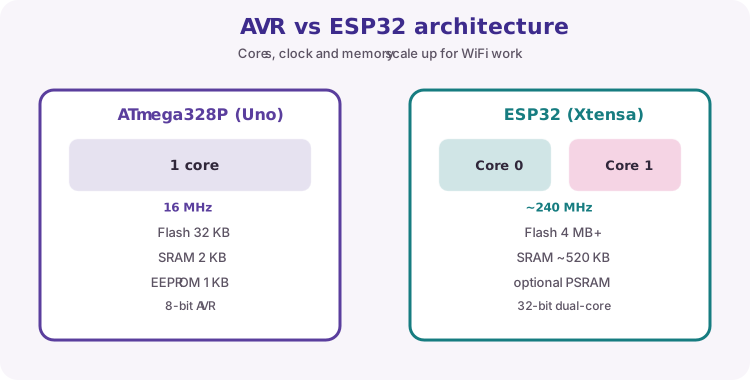
Classic Uno R3: 8-bit AVR ATmega328P at 16 MHz. Classic ESP32: Xtensa dual-core at much higher clocks. Newer members (C3, C5, C6, P4 and others) use RISC-V.
Sketches still look like setup/loop, but the SoC underneath includes radio (on most chips) and megabytes of Flash on the module.
| Feature | Uno R3 (ATmega328P) | Typical classic ESP32 DevKit |
|---|---|---|
| CPU | 8-bit AVR, 16 MHz | Xtensa dual-core (or RISC-V on C/P series) |
| Logic | 5 V I/O | 3.3 V I/O |
| Flash (program) | 32 KB | Often 4 MB on the module (varies) |
| SRAM | 2 KB | Hundreds of KB on-chip |
| Wi-Fi / BT | None on-board | Usually yes (check P4 / module docs) |
Flash, SRAM and PSRAM
Flash stores the program. SRAM is working memory. Some modules add PSRAM for large buffers. Wi-Fi stacks need far more RAM than Blink - free heap is your health check.
| Memory | Role |
|---|---|
| Flash | Program storage; survives power loss |
| SRAM | Live variables, stack, Wi-Fi / BT buffers |
| PSRAM (optional) | Extra working RAM on some modules |
When Uno is enough vs when ESP32 wins
Stay on Uno for local 5 V labs, shields and simple I/O. Move to ESP32 for Wi-Fi/BT, larger sketches or faster sampling - paying the cost of 3.3 V rules and different pin maps.
| Choose | Typical reasons |
|---|---|
| Uno | 5 V labs, shields, simple local control, Units A-F skills |
| ESP32 | Wi-Fi / BT, more RAM/Flash, higher speed, IoT nodes |
Board note for this unit
Default: Tools -> Board -> esp32 -> ESP32 Dev Module. Serial Monitor at 115200. Match C3/C6/P4 board entries to your silkscreen.
Wiring and safe build sequence
- USB data cable from PC to ESP32 DevKit
- Select ESP32 Dev Module (or matching board) and the correct port
- No external parts required
Worked sketch 1: Print the passport once
Download .ino sketchWhat this sketch is for: Discovery: confirm model, flash size and free heap after upload so you know which kit you are holding.
void setup() {
  Serial.begin(115200);
  delay(500);
  Serial.println("ESP32 board passport");
  Serial.print("Model: ");
  Serial.println(ESP.getChipModel());
  Serial.print("Flash: ");
  Serial.print(ESP.getFlashChipSize() / (1024 * 1024));
  Serial.println(" MB");
  Serial.print("Free heap: ");
  Serial.print(ESP.getFreeHeap());
  Serial.println(" bytes");
}

void loop() {}
How the code works
- Match Serial Monitor to 115200 baud.
- ESP.getChipModel(), getFlashChipSize() and getFreeHeap() are ESP32 Arduino helpers.
- Flash size is printed in megabytes for readability.
Worked sketch 2: Live heap passport
Download .ino sketchWhat this sketch is for: Useful meter for later labs: reprint free heap every 2 s with millis, and label whether heap looks comfortable for Wi-Fi work (teaching threshold).
unsigned long lastPrint = 0;
const unsigned long intervalMs = 2000;
const uint32_t wifiComfortHeap = 80000;

void printPassport() {
  uint32_t heap = ESP.getFreeHeap();
  Serial.print("Model ");
  Serial.print(ESP.getChipModel());
  Serial.print("  Flash ");
  Serial.print(ESP.getFlashChipSize() / (1024 * 1024));
  Serial.print(" MB  Heap ");
  Serial.print(heap);
  Serial.print(" bytes  ");
  Serial.println(heap >= wifiComfortHeap ? "[ok for Wi-Fi labs]" : "[low heap - watch allocations]");
}

void setup() {
  Serial.begin(115200);
  delay(500);
  Serial.println("Board passport meter");
  printPassport();
  lastPrint = millis();
}

void loop() {
  if (millis() - lastPrint >= intervalMs) {
    lastPrint = millis();
    printPassport();
  }
}
How the code works
- wifiComfortHeap is a teaching guide, not a hard datasheet limit.
- After you enable Wi-Fi in Unit H, compare heap here versus those sketches.
- millis avoids blocking delay so you can extend this meter later.
Test and record evidence
Practical evidence checklist
Common faults and checks
- Blank Serial: 115200 baud and board RESET.
- Upload fails: data USB cable, correct board/port, BOOT on some DevKits.
- Wrong board package: install esp32 by Espressif Systems.
Check your understanding
Q1. What project is the board passport?
Show answer
A Serial identity/health check for the ESP32 on your bench.
Q2. Why introduce ESP32 after Uno foundations?
Show answer
IoT and higher-capability projects need Wi-Fi/BT, speed or memory beyond the Uno.
Q3. What does free heap roughly tell you?
Show answer
How much allocatable SRAM remains.
Q4. When is the Uno still better?
Show answer
Local 5 V labs, shields and simple I/O without wireless needs.
Q5. What Serial baud do Unit G ESP32 examples use?
Show answer
115200.
Q6. What does Flash mainly store?
Show answer
The program (and often other non-volatile data).
Q7. Why watch heap before Wi-Fi labs?
Show answer
Wireless stacks use substantial SRAM.