
41. WiFi Fundamentals: Station vs Access Point
Join the LAN, then build a network health meter that reports RSSI and reconnects if the link drops.
Learning outcomes
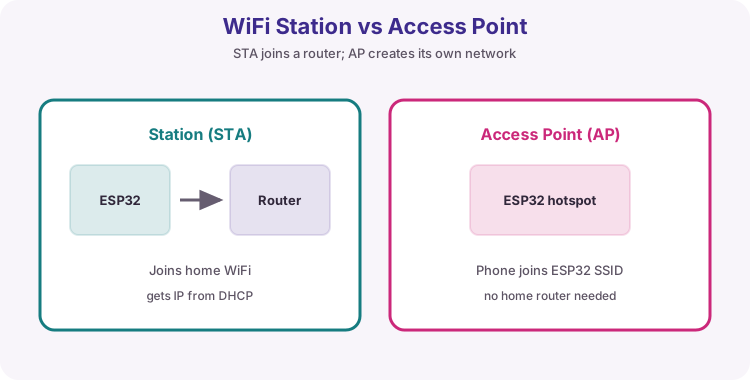
- Contrast Station (STA) with SoftAP and when each is used
- Join WiFi, print IP, gateway and RSSI
- Build a network health meter with millis reporting
- Classify link quality as strong / ok / weak from RSSI
- Attempt reconnect when the STA link drops
Parts and preparation
ESP32 DevKit (classic Wi-Fi capable), USB data cable, 2.4 GHz WiFi with known SSID and password. No external components.
Before power: inspect wiring, confirm supply voltage and ensure all connected circuits share GND.
Project: Network health meter
Before you host pages or call APIs, you need a trustworthy join - and a way to see if the link is still healthy. Sketch 1 proves Station connect and prints the address you will use in later labs. Sketch 2 is the useful meter: every 5 seconds it prints RSSI with a strong/ok/weak label and tries to reconnect if WiFi drops.
SoftAP (board as hotspot) returns in lesson 45 for first-boot setup.
| Mode | Who creates the network | This unit |
|---|---|---|
| STA | Existing router | Health meter + later web/MQTT |
| AP / SoftAP | ESP32 | Lesson 45 provisioning |
What happens when you join
Association authenticates with the SSID/password. DHCP then leases localIP(), subnet and gateway. Write the IP down for lesson 42. RSSI is dBm - more negative is weaker (about -40 strong, -80 weak).
| Value | Meaning |
|---|---|
| localIP() | ESP32 address on the LAN |
| gatewayIP() | Usually the router |
| RSSI() | Signal strength in dBm |
| WL_CONNECTED | Safe to use networking APIs |
Status and pre-flight
Poll WiFi.status() until WL_CONNECTED. Classic ESP32 needs 2.4 GHz. Guest WiFi often blocks device-to-device traffic - use the main LAN for web labs.
| Check | Why |
|---|---|
| SSID exact | Spaces and capitals matter |
| Password correct | Wrong password = endless dots |
| 2.4 GHz | No 5 GHz radio on classic ESP32 |
| Data USB cable | Charge-only = no Serial/port |
Credentials
Replace YOUR_WIFI_SSID and YOUR_WIFI_PASSWORD before upload. Never commit real passwords to public repos. Products need SoftAP setup (lesson 45).
Wiring and safe build sequence
- USB data cable PC to ESP32
- Board: ESP32 Dev Module (or matching), correct port
- Serial Monitor 115200
Worked sketch 1: Join the LAN and prove the IP
Download .ino sketchWhat this sketch is for: Discovery: Station mode joins the router and prints IP, gateway and RSSI once. Write the IP down - lesson 42 opens http://that-ip/.
#include <WiFi.h>

const char* ssid = "YOUR_WIFI_SSID";
const char* password = "YOUR_WIFI_PASSWORD";

void setup() {
  Serial.begin(115200);
  delay(500);

  Serial.print("Connecting to ");
  Serial.println(ssid);
  WiFi.mode(WIFI_STA);
  WiFi.begin(ssid, password);

  while (WiFi.status() != WL_CONNECTED) {
    delay(500);
    Serial.print(".");
  }

  Serial.println();
  Serial.println("WiFi connected");
  Serial.print("IP address:  ");
  Serial.println(WiFi.localIP());
  Serial.print("Gateway:     ");
  Serial.println(WiFi.gatewayIP());
  Serial.print("RSSI (dBm):  ");
  Serial.println(WiFi.RSSI());
}

void loop() {
}
How the code works
- Replace the two placeholders with your 2.4 GHz SSID and password.
- WiFi.mode(WIFI_STA) makes Station intent explicit.
- Empty loop on purpose - sketch 2 adds the meter.
Worked sketch 2: Network health meter
Download .ino sketchWhat this sketch is for: Useful monitor you could leave running on a bench: every 5 s print RSSI with strong/ok/weak, and call WiFi.reconnect() if the link drops.
#include <WiFi.h>

const char* ssid = "YOUR_WIFI_SSID";
const char* password = "YOUR_WIFI_PASSWORD";
unsigned long lastReport = 0;

const char* qualityLabel(int rssi) {
  if (rssi >= -55) return "strong";
  if (rssi >= -70) return "ok";
  return "weak";
}

void setup() {
  Serial.begin(115200);
  delay(500);
  WiFi.mode(WIFI_STA);
  WiFi.begin(ssid, password);
  Serial.print("Connecting");
  while (WiFi.status() != WL_CONNECTED) {
    delay(500);
    Serial.print(".");
  }
  Serial.println();
  Serial.print("Health meter IP ");
  Serial.println(WiFi.localIP());
}

void loop() {
  if (millis() - lastReport < 5000) return;
  lastReport = millis();

  if (WiFi.status() != WL_CONNECTED) {
    Serial.println("Link down - reconnecting...");
    WiFi.reconnect();
    return;
  }

  int rssi = WiFi.RSSI();
  Serial.print("RSSI ");
  Serial.print(rssi);
  Serial.print(" dBm (");
  Serial.print(qualityLabel(rssi));
  Serial.println(")");
}
How the code works
- millis timer avoids blocking delay(5000) in loop.
- Bands are teaching defaults - tune for your building.
- Walk away from the router and watch strong -> ok -> weak.
Test and record evidence
Practical evidence checklist
Common faults and checks
- Endless dots: SSID, password, 2.4 GHz.
- Guest WiFi: use main LAN for later web labs.
- No Serial: 115200, data cable, EN/RESET.
Check your understanding
Q1. What project does sketch 2 implement?
Show answer
A network health meter with RSSI quality labels.
Q2. What does STA mode mean?
Show answer
The ESP32 joins an existing router.
Q3. What does localIP() return?
Show answer
The ESP32 IPv4 address on the LAN.
Q4. What does a more negative RSSI mean?
Show answer
Weaker signal.
Q5. Why write the IP down?
Show answer
Later labs open http://that-ip/ on the same WiFi.
Q6. Why might 5 GHz-only fail?
Show answer
Classic ESP32 is 2.4 GHz only.
Q7. What does sketch 2 do on link down?
Show answer
Print reconnecting and call WiFi.reconnect().
Q8. Why avoid committing real passwords?
Show answer
Credentials can be misused; use placeholders.