
44. MQTT Publish and Subscribe
Build a remote thermostat channel: publish temperature and switch a heater-sim LED from an MQTT command topic.
Learning outcomes
- Explain broker, topic, publish and subscribe
- Publish temperature and subscribe to a heater command
- Use PubSubClient with millis publish timing
- Run a DHT-based thermostat channel (sketch 2)
- Keep client.loop() responsive
Parts and preparation
ESP32 DevKit, USB, LED + resistor on GPIO 2 (heater sim). Sketch 1 needs no DHT. Sketch 2: DHT11 data on GPIO 4, 3.3 V and GND (add 4.7k-10k pull-up on data if your module has none). Libraries: PubSubClient by Nick O'Leary; sketch 2 also Adafruit DHT sensor library + Adafruit Unified Sensor.
Before power: inspect wiring, confirm supply voltage and ensure all connected circuits share GND.
Libraries for this lesson
In Arduino IDE 2 open Tools → Manage Libraries…. Search by the Library Manager name and install the package by the exact author below. Similar names from other authors can use different APIs and will break the example.
| Include | Library Manager name | Author | Install note |
|---|---|---|---|
WiFi.h | WiFi | Espressif | Built into the esp32 Arduino core. |
PubSubClient.h | PubSubClient | Nick O'Leary | Install PubSubClient by Nick O'Leary via Library Manager. |
DHT.h | DHT sensor library | Adafruit | For sketch 2: install DHT sensor library by Adafruit and Adafruit Unified Sensor. |
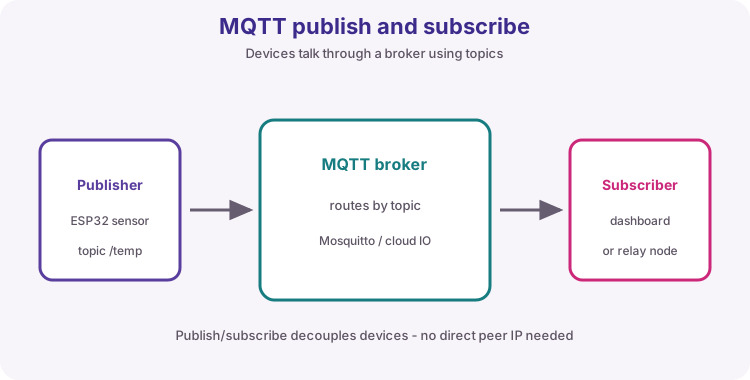
Project: Remote thermostat channel
Build an MQTT channel for a simple thermostat idea: the board publishes temperature, and a dashboard or phone MQTT client publishes on/off to a heater-sim LED.
Sketch 1 discovers publish/subscribe with a fake temperature (no DHT). Sketch 2 is the useful node with a real DHT11 reading. Use a unique topic prefix on public brokers (add your name).
Broker, topics, payloads
Broker test.mosquitto.org port 1883 is a public sandbox - no secrets. Topics must match exactly. Payloads here are plain text; JSON is a natural extension.
| Idea | This lesson |
|---|---|
| Publish | wilteq/lab/temp |
| Subscribe | wilteq/lab/heater with on/off |
| Heater sim | GPIO 2 LED |
MQTT vs HTTP
HTTP is great for one-shot documents (lesson 43). MQTT fits live both-ways updates without polling.
Client loop
Call client.loop() often. Publish on a millis timer - same responsiveness rule as web servers.
Wiring and safe build sequence
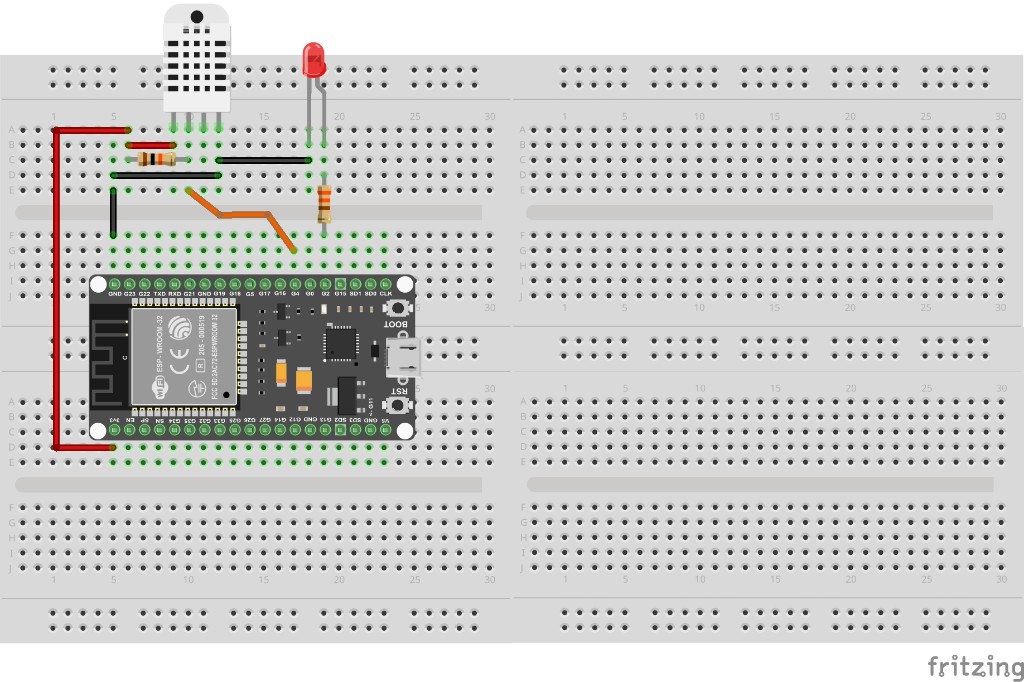
- GPIO 2 -> resistor -> LED (heater sim)
- Sketch 2: DHT11 VCC->3V3, GND->GND, DATA->GPIO 4 (+ pull-up if needed)
Worked sketch 1: Fake temp channel (no DHT)
Download .ino sketchWhat this sketch is for: Discover MQTT: publish a rising fake temperature and toggle the heater LED from topic wilteq/lab/heater.
#include <WiFi.h>
#include <PubSubClient.h>

const char* ssid = "YOUR_WIFI_SSID";
const char* password = "YOUR_WIFI_PASSWORD";
const char* mqttHost = "test.mosquitto.org";
const int mqttPort = 1883;

const char* topicTemp = "wilteq/lab/temp";
const char* topicHeater = "wilteq/lab/heater";

WiFiClient wifi;
PubSubClient client(wifi);
const int heaterPin = 2;
float fakeTemp = 20.0;
unsigned long lastPub = 0;

void callback(char* topic, byte* payload, unsigned int length) {
  String msg;
  for (unsigned int i = 0; i < length; i++) msg += (char)payload[i];
  msg.trim();
  Serial.print("RX ");
  Serial.println(msg);
  if (msg == "on") digitalWrite(heaterPin, HIGH);
  if (msg == "off") digitalWrite(heaterPin, LOW);
}

void connectMqtt() {
  while (!client.connected()) {
    Serial.print("MQTT...");
    if (client.connect("wilteq-esp32-lab")) {
      Serial.println("ok");
      client.subscribe(topicHeater);
    } else {
      Serial.println(client.state());
      delay(2000);
    }
  }
}

void setup() {
  Serial.begin(115200);
  pinMode(heaterPin, OUTPUT);
  WiFi.mode(WIFI_STA);
  WiFi.begin(ssid, password);
  while (WiFi.status() != WL_CONNECTED) {
    delay(500);
    Serial.print(".");
  }
  Serial.println(WiFi.localIP());
  client.setServer(mqttHost, mqttPort);
  client.setCallback(callback);
}

void loop() {
  if (!client.connected()) connectMqtt();
  client.loop();

  if (millis() - lastPub > 5000) {
    lastPub = millis();
    fakeTemp += 0.1;
    if (fakeTemp > 30.0) fakeTemp = 20.0;
    char buf[16];
    dtostrf(fakeTemp, 4, 1, buf);
    client.publish(topicTemp, buf);
    Serial.print("TX temp ");
    Serial.println(buf);
  }
}
How the code works
- Change topic prefix if the lab broker is busy.
- Publish on/off to wilteq/lab/heater from any MQTT client.
Worked sketch 2: DHT thermostat channel
Download .ino sketchWhat this sketch is for: Useful node: read DHT11 on GPIO 4, publish real Celsius on wilteq/lab/temp, and drive the heater-sim LED from wilteq/lab/heater on/off commands. Match the breadboard layout below before upload.
#include <WiFi.h>
#include <PubSubClient.h>
#include <DHT.h>

const char* ssid = "YOUR_WIFI_SSID";
const char* password = "YOUR_WIFI_PASSWORD";
const char* mqttHost = "test.mosquitto.org";
const int mqttPort = 1883;

const char* topicTemp = "wilteq/lab/temp";
const char* topicHeater = "wilteq/lab/heater";

#define DHTPIN 4
#define DHTTYPE DHT11
DHT dht(DHTPIN, DHTTYPE);

WiFiClient wifi;
PubSubClient client(wifi);
const int heaterPin = 2;
unsigned long lastPub = 0;

void callback(char* topic, byte* payload, unsigned int length) {
  String msg;
  for (unsigned int i = 0; i < length; i++) msg += (char)payload[i];
  msg.trim();
  Serial.print("Heater cmd ");
  Serial.println(msg);
  if (msg == "on") digitalWrite(heaterPin, HIGH);
  if (msg == "off") digitalWrite(heaterPin, LOW);
}

void connectMqtt() {
  while (!client.connected()) {
    if (client.connect("wilteq-esp32-thermo")) {
      client.subscribe(topicHeater);
      Serial.println("MQTT ok");
    } else {
      Serial.println(client.state());
      delay(2000);
    }
  }
}

void setup() {
  Serial.begin(115200);
  pinMode(heaterPin, OUTPUT);
  dht.begin();

  WiFi.mode(WIFI_STA);
  WiFi.begin(ssid, password);
  while (WiFi.status() != WL_CONNECTED) {
    delay(500);
    Serial.print(".");
  }
  Serial.println(WiFi.localIP());
  client.setServer(mqttHost, mqttPort);
  client.setCallback(callback);
}

void loop() {
  if (!client.connected()) connectMqtt();
  client.loop();

  if (millis() - lastPub > 5000) {
    lastPub = millis();
    float t = dht.readTemperature();
    if (isnan(t)) {
      Serial.println("DHT read failed");
      return;
    }
    char buf[16];
    dtostrf(t, 4, 1, buf);
    client.publish(topicTemp, buf);
    Serial.print("TX DHT C ");
    Serial.println(buf);
  }
}
How the code works
- Install Adafruit DHT + Unified Sensor for sketch 2.
- DHT11 is slow - 5 s publish interval is appropriate.
- Unique client id wilteq-esp32-thermo avoids collisions with sketch 1.
- Build from the breadboard photo: DHT11 on GPIO 4, heater LED on GPIO 2.
Test and record evidence
Practical evidence checklist
Common faults and checks
- MQTT fail: firewall on 1883 or try a local Mosquitto host.
- DHT nan: wiring, pull-up, power from 3V3.
- Subscribe silent: exact topic string; client.loop() running.
Check your understanding
Q1. What project is this?
Show answer
A remote thermostat MQTT channel.
Q2. What is a broker?
Show answer
Server that routes publish/subscribe messages.
Q3. Publish vs subscribe?
Show answer
Publish sends; subscribe receives matching topics.
Q4. Why client.loop()?
Show answer
Keep-alives and deliver callbacks.
Q5. What does sketch 2 add?
Show answer
Real DHT11 temperature instead of fakeTemp.
Q6. Heater payload for ON?
Show answer
on
Q7. Why unique topics on public brokers?
Show answer
Avoid colliding with other learners.
Q8. MQTT vs HTTP for live control?
Show answer
MQTT fits both-ways live updates better.