
48. FreeRTOS Tasks and Dual-Core Basics
Build an alive monitor: a snappy status LED in loop while a worker task samples slowly on another core.
Learning outcomes
- State that Arduino-ESP32 runs on FreeRTOS
- Pin a worker task and keep loop responsive
- Use vTaskDelay in the worker instead of blocking loop
- Explain why a slow sample must not freeze a status blink
- Name race conditions and queues as the next tools
Parts and preparation
ESP32 DevKit (dual-core classic preferred), USB cable, LED on GPIO 2, potentiometer on GPIO 34 for sketch 2.
Before power: inspect wiring, confirm supply voltage and ensure all connected circuits share GND.
Project: Alive monitor
Devices need a heartbeat people can see even while slow work runs (sampling, SD writes, maths). If sampling uses delay(2000) inside loop, the status LED freezes and looks dead.
Sketch 1 shows two cores printing and blinking. Sketch 2 is the product pattern: worker task samples ADC every 2 s; loop keeps a snappy alive blink.
Arduino on FreeRTOS
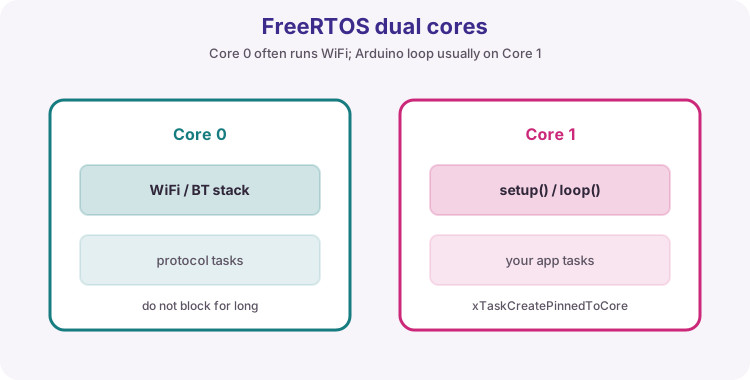
setup()/loop() usually run on core 1. Protocol stacks often use core 0. xTaskCreatePinnedToCore adds workers. Prefer millis in one loop when that is enough; add a task when slow work would block the UI or networking.
| Item | Course default |
|---|---|
| Core 1 | setup / loop |
| Core 0 | Stacks + optional workers |
| vTaskDelay | Wait inside a task without busy-spin |
| Stack | Start 2048; raise if reboot |
Shared data: races, then queues
Sketch 2 writes latestSample from the worker and reads it from loop for Serial - acceptable for a teaching int on ESP32 for this lab, but torn data is possible for larger structs. Production code should use a queue or mutex. Learn the names now.
When not to add a task
Do not spawn a task per LED. handleClient / client.loop / ArduinoOTA.handle often share one millis-driven loop.
Wiring and safe build sequence
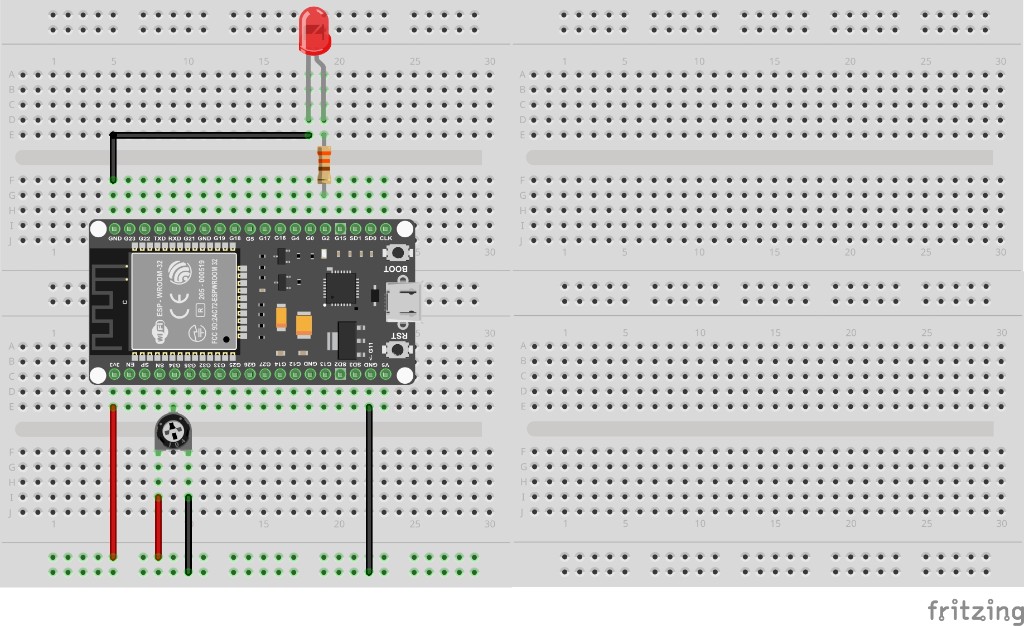
- GPIO 2 LED for alive blink
- Sketch 2: pot on GPIO 34 (3V3 / wiper / GND)
- Serial 115200
Worked sketch 1: Two cores visible
Download .ino sketchWhat this sketch is for: See FreeRTOS concurrency: a pinned print task and a blinking loop on another core.
#if CONFIG_FREERTOS_UNICORE
#define ARDUINO_RUNNING_CORE 0
#else
#define ARDUINO_RUNNING_CORE 1
#endif

const int ledPin = 2;

void printTask(void *param) {
  (void)param;
  for (;;) {
    Serial.print("printTask on core ");
    Serial.println(xPortGetCoreID());
    vTaskDelay(pdMS_TO_TICKS(1000));
  }
}

void setup() {
  Serial.begin(115200);
  pinMode(ledPin, OUTPUT);

  BaseType_t ok = xTaskCreatePinnedToCore(
    printTask, "printTask", 2048, NULL, 1, NULL, 0
  );
  if (ok != pdPASS) Serial.println("Failed to create printTask");

  Serial.print("loop will run on core ");
  Serial.println(ARDUINO_RUNNING_CORE);
}

void loop() {
  digitalWrite(ledPin, HIGH);
  delay(250);
  digitalWrite(ledPin, LOW);
  delay(250);
}
How the code works
- Pinned to core 0 on dual-core chips.
- xPortGetCoreID() shows which core printed.
- Unicore boards may show core 0 for both - still valid FreeRTOS practice.
Worked sketch 2: Alive LED + slow ADC worker
Download .ino sketchWhat this sketch is for: Product pattern: worker samples the pot every 2 s with vTaskDelay; loop blinks fast so the node still looks alive. Compare with putting delay(2000) in loop. Match the breadboard layout below before upload.
#if CONFIG_FREERTOS_UNICORE
#define ARDUINO_RUNNING_CORE 0
#else
#define ARDUINO_RUNNING_CORE 1
#endif

const int ledPin = 2;
const int sensePin = 34;
volatile int latestSample = 0;

void sampleTask(void *param) {
  (void)param;
  for (;;) {
    latestSample = analogRead(sensePin);
    Serial.print("sample ");
    Serial.print(latestSample);
    Serial.print(" on core ");
    Serial.println(xPortGetCoreID());
    vTaskDelay(pdMS_TO_TICKS(2000));
  }
}

void setup() {
  Serial.begin(115200);
  pinMode(ledPin, OUTPUT);

  xTaskCreatePinnedToCore(sampleTask, "sampleTask", 2048, NULL, 1, NULL, 0);
  Serial.println("Alive monitor: fast blink + slow samples");
}

void loop() {
  digitalWrite(ledPin, HIGH);
  delay(120);
  digitalWrite(ledPin, LOW);
  delay(120);
}
How the code works
- Slow sampling lives in sampleTask - loop never waits 2 seconds.
- latestSample is a simple shared int for teaching; use a queue in larger projects.
- If you move delay(2000) into loop, the alive LED freezes - that is the lesson.
- Build from the breadboard photo: pot on GPIO 34, alive LED on GPIO 2.
Test and record evidence
Practical evidence checklist
Common faults and checks
- One core ID only: normal on unicore C-series.
- Reboot under load: increase task stack size.
- ADC stuck: pot wiring on GPIO 34.
Check your understanding
Q1. What problem does the alive monitor solve?
Show answer
Keep a visible heartbeat while slow work runs elsewhere.
Q2. What OS sits under Arduino-ESP32?
Show answer
FreeRTOS.
Q3. Which API creates a pinned task?
Show answer
xTaskCreatePinnedToCore.
Q4. Why use vTaskDelay in the worker?
Show answer
Yield to the scheduler instead of busy-waiting.
Q5. What goes wrong if delay(2000) is in loop?
Show answer
The status LED freezes for two seconds each sample.
Q6. What is a race condition risk?
Show answer
Unsynchronised shared data between tasks.
Q7. Name a safer hand-off than a raw global
Show answer
A FreeRTOS queue or mutex.
Q8. When should you skip adding a task?
Show answer
When one millis-driven loop already stays responsive.