
45. Credentials, Reconnect and SoftAP Provisioning
Build a first-boot WiFi setup path: try STA, then open SoftAP with a form that captures credentials on Serial.
Learning outcomes
- Explain why hardcoded credentials fail for products
- Retry STA with millis then fall back to SoftAP
- Serve a SoftAP setup form and read POSTed SSID/password
- State how Preferences/NVS would store credentials next
- Test both STA-success and SoftAP-fallback paths
Parts and preparation
ESP32 DevKit, USB, phone or PC that can join SoftAP ESP32-Setup.
Before power: inspect wiring, confirm supply voltage and ensure all connected circuits share GND.
Libraries for this lesson
In Arduino IDE 2 open Tools → Manage Libraries…. Search by the Library Manager name and install the package by the exact author below. Similar names from other authors can use different APIs and will break the example.
| Include | Library Manager name | Author | Install note |
|---|---|---|---|
WiFi.h | WiFi | Espressif | Built into the esp32 Arduino core. |
WebServer.h | WebServer | Espressif | Built into the esp32 Arduino core. |
Project: First-boot WiFi setup
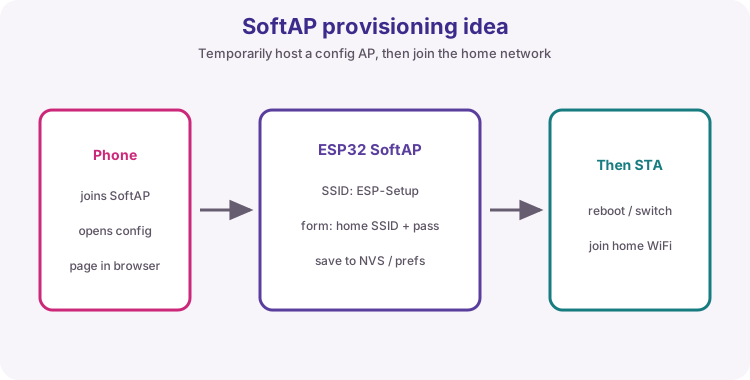
Shipped devices cannot embed every customer's WiFi password in source. First-boot SoftAP lets a phone join ESP32-Setup and submit credentials.
Sketch 1 proves STA fail -> SoftAP notice page. Sketch 2 is the useful setup form: POST ssid/password and print them on Serial. Saving with Preferences/NVS is the clear next product step (challenge).
Non-blocking STA wait
Count millis gaps instead of blocking forever. After maxTries, start SoftAP.
| Phase | What you see |
|---|---|
| STA trying | Serial dots |
| STA OK | LAN IP; SoftAP off |
| STA failed | SoftAP ESP32-Setup; open softAP IP |
Form, then NVS
HTML form POSTs fields to a handler. server.hasArg("ssid") reads them. Preferences.h putString/getString would store them in NVS across resets - out of scope for the worked SoftAP form, required thinking for products.
How to test
Wrong placeholders force SoftAP. Correct placeholders show STA OK. softAPIP() is often 192.168.4.1.
Wiring and safe build sequence
- USB only
- Phone joins ESP32-Setup for SoftAP tests
Worked sketch 1: STA fail to SoftAP notice
Download .ino sketchWhat this sketch is for: Discovery: after repeated STA failures, SoftAP ESP32-Setup serves a configure-me page.
#include <WiFi.h>
#include <WebServer.h>

const char* ssid = "YOUR_WIFI_SSID";
const char* password = "YOUR_WIFI_PASSWORD";

const int maxTries = 20;
const unsigned long retryMs = 500;

WebServer server(80);
bool provisioning = false;
int tries = 0;
unsigned long lastTry = 0;

void handleRoot() {
  server.send(200, "text/html",
    "<!DOCTYPE html><html><body style='font-family:sans-serif;text-align:center;margin-top:40px'>"
    "<h1>ESP32-Setup</h1>"
    "<p>STA join failed - SoftAP is active.</p>"
    "<p>Upload sketch 2 for a credentials form.</p>"
    "</body></html>");
}

void startSoftAP() {
  provisioning = true;
  WiFi.mode(WIFI_AP);
  WiFi.softAP("ESP32-Setup");
  Serial.print("SoftAP IP: ");
  Serial.println(WiFi.softAPIP());
  server.on("/", handleRoot);
  server.begin();
}

void setup() {
  Serial.begin(115200);
  WiFi.mode(WIFI_STA);
  WiFi.begin(ssid, password);
  lastTry = millis();
  Serial.println("Trying STA...");
}

void loop() {
  if (provisioning) {
    server.handleClient();
    return;
  }
  if (WiFi.status() == WL_CONNECTED) {
    Serial.print("STA OK ");
    Serial.println(WiFi.localIP());
    delay(10000);
    return;
  }
  if (millis() - lastTry >= retryMs) {
    lastTry = millis();
    tries++;
    Serial.print(".");
    if (tries >= maxTries) {
      Serial.println();
      startSoftAP();
    }
  }
}
How the code works
- Use wrong placeholders to force SoftAP in a demo.
- Join ESP32-Setup and open the printed SoftAP IP.
Worked sketch 2: SoftAP credentials form
Download .ino sketchWhat this sketch is for: First-boot style form on SoftAP: submit SSID and password, see them printed on Serial. This does not yet save to NVS - that is the deliberate next step.
#include <WiFi.h>
#include <WebServer.h>

WebServer server(80);

void handleRoot() {
  server.send(200, "text/html",
    "<!DOCTYPE html><html><body style='font-family:sans-serif;margin:24px'>"
    "<h1>ESP32-Setup</h1>"
    "<p>Enter WiFi credentials (printed on Serial only in this lab).</p>"
    "<form method='POST' action='/save'>"
    "<p>SSID<br><input name='ssid' style='width:90%'></p>"
    "<p>Password<br><input name='password' type='password' style='width:90%'></p>"
    "<button type='submit'>Save</button>"
    "</form></body></html>");
}

void handleSave() {
  String newSsid = server.hasArg("ssid") ? server.arg("ssid") : "";
  String newPass = server.hasArg("password") ? server.arg("password") : "";
  Serial.println("Form received:");
  Serial.print("  SSID=");
  Serial.println(newSsid);
  Serial.print("  PASS=");
  Serial.println(newPass);
  server.send(200, "text/html",
    "<!DOCTYPE html><html><body style='font-family:sans-serif;text-align:center;margin-top:40px'>"
    "<h1>Received</h1><p>Check Serial Monitor. Next step: store with Preferences/NVS.</p>"
    "<p><a href='/'>Back</a></p></body></html>");
}

void setup() {
  Serial.begin(115200);
  WiFi.mode(WIFI_AP);
  WiFi.softAP("ESP32-Setup");
  Serial.print("SoftAP IP: ");
  Serial.println(WiFi.softAPIP());
  server.on("/", handleRoot);
  server.on("/save", HTTP_POST, handleSave);
  server.begin();
  Serial.println("Join ESP32-Setup and open the SoftAP IP");
}

void loop() {
  server.handleClient();
}
How the code works
- HTTP_POST maps the form action /save.
- server.arg reads field values by name.
- Do not treat Serial-printed passwords as a product storage design.
Test and record evidence
Practical evidence checklist
Common faults and checks
- SoftAP missing: wait for maxTries; watch Serial.
- Form does nothing: use POST /save; open softAPIP exactly.
- Phone blocks page: try another device.
Check your understanding
Q1. What project is this?
Show answer
First-boot WiFi setup over SoftAP.
Q2. Why are hardcoded passwords a product problem?
Show answer
Each site differs; secrets should not live in shared firmware source.
Q3. What SSID does SoftAP use?
Show answer
ESP32-Setup.
Q4. What does sketch 2 add?
Show answer
An HTML form that POSTs credentials to Serial.
Q5. Is NVS required in the worked form?
Show answer
No - taught as the next step.
Q6. Typical SoftAP IP?
Show answer
Often 192.168.4.1.
Q7. How to force SoftAP in sketch 1?
Show answer
Use wrong YOUR_WIFI placeholders.
Q8. Why millis retries?
Show answer
Abandon STA after N tries without blocking forever.