
46. Bluetooth Low Energy Essentials
Build a phone-controlled desk lamp over BLE: advertise, write on/off, then notify the phone of lamp state.
Learning outcomes
- Frame a BLE GATT lamp as a short-range product without Wi-Fi
- Explain advertising, connection, service, characteristic and UUID
- Toggle GPIO from a phone characteristic write
- Notify the phone when lamp state changes (including from Serial)
- Contrast BLE with Wi-Fi for desk-scale control
Parts and preparation
ESP32 board with Bluetooth LE (classic ESP32 or C3/C5/C6 - not P4 without companion). USB data cable, LED + resistor on GPIO 2 (desk lamp stand-in). Phone with nRF Connect or similar.
Before power: inspect wiring, confirm supply voltage and ensure all connected circuits share GND.
Libraries for this lesson
In Arduino IDE 2 open Tools → Manage Libraries…. Search by the Library Manager name and install the package by the exact author below. Similar names from other authors can use different APIs and will break the example.
| Include | Library Manager name | Author | Install note |
|---|---|---|---|
BLEDevice.h | ESP32 BLE Arduino | Espressif | Built into the esp32 Arduino core (BLEDevice, BLEServer, BLEUtils). No Library Manager install required. |
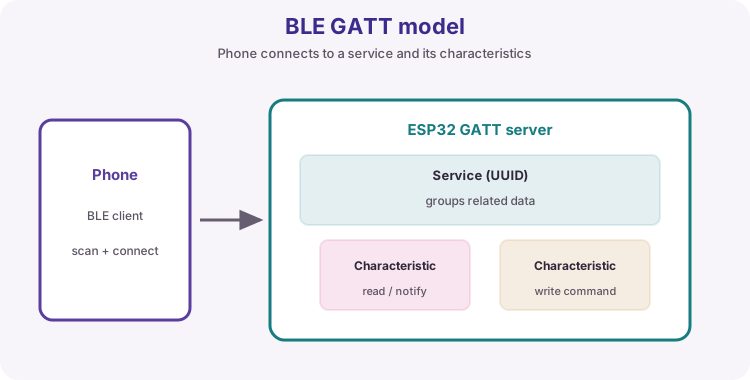
Project: Phone desk lamp
You are building a short-range desk lamp you can switch from a phone with no home Wi-Fi. Success looks like: phone finds WilteqLamp, writing 1/0 turns the LED, and the phone can see the current state when you also change it from Serial.
Sketch 1 proves advertise + write. Sketch 2 adds NOTIFY so the phone stays in sync - the behaviour you would want on a real BLE accessory.
| Need | Often better fit |
|---|---|
| Browser on the LAN / cloud API | Wi-Fi (Unit H) |
| Phone next to a gadget, no router | BLE GATT |
| Audio headset style link | Classic BT (not this course) |
Advertising, then connecting
A BLE peripheral (the ESP32) advertises a name and service UUID. A central (phone app) connects, discovers GATT, then reads/writes characteristics. On disconnect, restart advertising so the next phone can find the lamp.
| Phase | What happens |
|---|---|
| Advertise | ESP32 broadcasts WilteqLamp + service UUID |
| Connect | Phone becomes the GATT client |
| Write | Phone sends 1 or 0 to switch the lamp |
| Notify | ESP32 pushes state changes to the phone |
| Disconnect | Advertising restarts |
GATT: service, characteristic, UUID
A service groups characteristics. A characteristic is the value (lamp on/off). Custom 128-bit UUIDs identify your service and characteristic in the phone app. Properties: READ, WRITE, and NOTIFY (server pushes updates).
| Term | Role in this project |
|---|---|
| Peripheral / server | ESP32 lamp |
| Central / client | Phone app |
| Characteristic value | ASCII 1 = on, 0 = off |
| NOTIFY | Phone learns state after Serial change |
Phone lab walkthrough
1) Upload sketch 1; Serial says advertising. 2) nRF Connect: scan, connect to WilteqLamp, open the custom service. 3) Write text 1 / 0 (or hex 0x31 / 0x30). 4) Upload sketch 2; enable notifications on the characteristic; type 1 or 0 in Serial Monitor.
Board and API notes
Classic ESP32 and many C-series chips include BLE. ESP32-P4 needs a companion radio. If getValue() type errors appear, your core may return std::string instead of String - adjust one line.
Wiring and safe build sequence
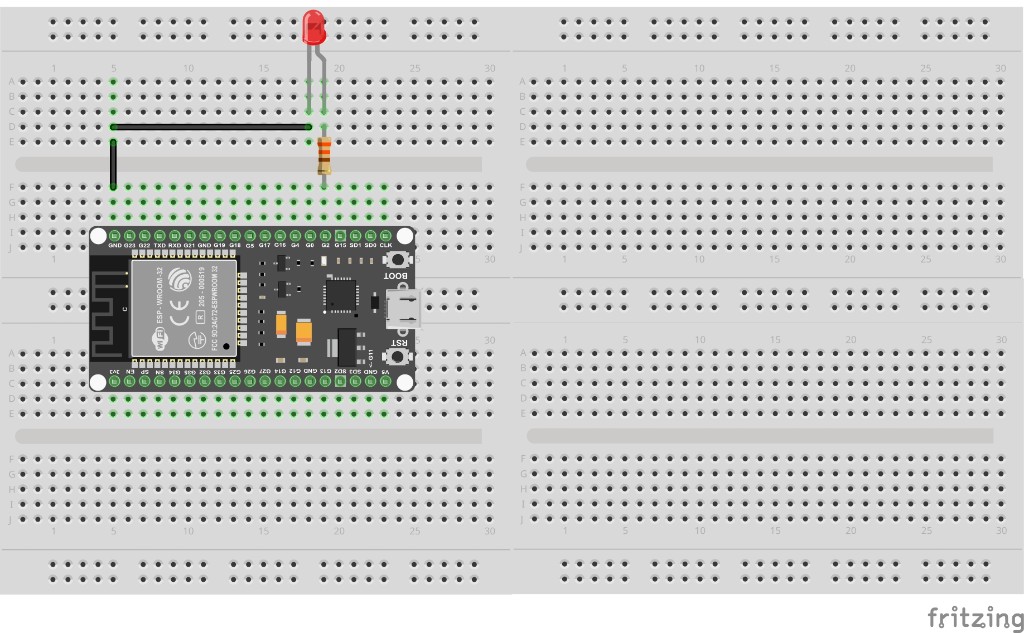
- GPIO 2 -> series resistor -> LED anode; cathode -> GND (desk lamp stand-in)
- USB power; BLE-capable ESP32 board
- Phone within a few metres; Bluetooth on
Worked sketch 1: Advertise and switch from the phone
Download .ino sketchWhat this sketch is for: Prove the lamp path: phone finds WilteqLamp and writing ASCII 1/0 toggles GPIO 2. No notify yet - discover write callbacks first.
#include <BLEDevice.h>
#include <BLEUtils.h>
#include <BLEServer.h>

#define SERVICE_UUID        "4fafc201-1fb5-459e-8fcc-c5c9c331914b"
#define CHARACTERISTIC_UUID "beb5483e-36e1-4688-b7f5-ea07361b26a8"

const int ledPin = 2;

class ServerCallbacks : public BLEServerCallbacks {
  void onConnect(BLEServer *pServer) {
    Serial.println("Central connected");
  }
  void onDisconnect(BLEServer *pServer) {
    Serial.println("Central disconnected - advertising again");
    BLEDevice::startAdvertising();
  }
};

class LedCallbacks : public BLECharacteristicCallbacks {
  void onWrite(BLECharacteristic *pCharacteristic) {
    String value = pCharacteristic->getValue();
    if (value.length() < 1) return;
    if (value[0] == '1') digitalWrite(ledPin, HIGH);
    if (value[0] == '0') digitalWrite(ledPin, LOW);
    Serial.print("Write: ");
    Serial.println(value.c_str());
  }
};

void setup() {
  Serial.begin(115200);
  pinMode(ledPin, OUTPUT);
  digitalWrite(ledPin, LOW);

  BLEDevice::init("WilteqLamp");
  BLEServer *pServer = BLEDevice::createServer();
  pServer->setCallbacks(new ServerCallbacks());

  BLEService *pService = pServer->createService(SERVICE_UUID);
  BLECharacteristic *pCharacteristic = pService->createCharacteristic(
    CHARACTERISTIC_UUID,
    BLECharacteristic::PROPERTY_READ | BLECharacteristic::PROPERTY_WRITE
  );
  pCharacteristic->setCallbacks(new LedCallbacks());
  pCharacteristic->setValue("0");
  pService->start();

  BLEAdvertising *pAdvertising = BLEDevice::getAdvertising();
  pAdvertising->addServiceUUID(SERVICE_UUID);
  pAdvertising->setScanResponse(true);
  pAdvertising->start();
  Serial.println("Desk lamp advertising as WilteqLamp");
  Serial.println("Write ASCII 1 or 0 from the phone");
}

void loop() {
  delay(200);
}
How the code works
- Device name WilteqLamp is what the phone scanner shows.
- onWrite drives the lamp from the first ASCII character.
- onDisconnect restarts advertising for the next connection.
Worked sketch 2: Desk lamp with NOTIFY + Serial control
Download .ino sketchWhat this sketch is for: Same lamp, product behaviour: phone writes still work, and enabling notifications lets the phone see state when you type 1 or 0 in Serial Monitor. Match the breadboard layout below before upload.
#include <BLEDevice.h>
#include <BLEUtils.h>
#include <BLEServer.h>
#include <BLE2902.h>

#define SERVICE_UUID        "4fafc201-1fb5-459e-8fcc-c5c9c331914b"
#define CHARACTERISTIC_UUID "beb5483e-36e1-4688-b7f5-ea07361b26a8"

const int ledPin = 2;
BLECharacteristic *pLampChar = nullptr;
bool lampOn = false;

void setLamp(bool on, bool fromSerial) {
  lampOn = on;
  digitalWrite(ledPin, lampOn ? HIGH : LOW);
  if (pLampChar) {
    pLampChar->setValue(lampOn ? "1" : "0");
    pLampChar->notify();
  }
  Serial.print(fromSerial ? "Serial -> lamp " : "Phone -> lamp ");
  Serial.println(lampOn ? "ON" : "OFF");
}

class ServerCallbacks : public BLEServerCallbacks {
  void onConnect(BLEServer *pServer) {
    Serial.println("Central connected");
  }
  void onDisconnect(BLEServer *pServer) {
    Serial.println("Central disconnected - advertising again");
    BLEDevice::startAdvertising();
  }
};

class LedCallbacks : public BLECharacteristicCallbacks {
  void onWrite(BLECharacteristic *pCharacteristic) {
    String value = pCharacteristic->getValue();
    if (value.length() < 1) return;
    if (value[0] == '1') setLamp(true, false);
    if (value[0] == '0') setLamp(false, false);
  }
};

void setup() {
  Serial.begin(115200);
  pinMode(ledPin, OUTPUT);

  BLEDevice::init("WilteqLamp");
  BLEServer *pServer = BLEDevice::createServer();
  pServer->setCallbacks(new ServerCallbacks());

  BLEService *pService = pServer->createService(SERVICE_UUID);
  pLampChar = pService->createCharacteristic(
    CHARACTERISTIC_UUID,
    BLECharacteristic::PROPERTY_READ |
    BLECharacteristic::PROPERTY_WRITE |
    BLECharacteristic::PROPERTY_NOTIFY
  );
  pLampChar->addDescriptor(new BLE2902());
  pLampChar->setCallbacks(new LedCallbacks());
  pLampChar->setValue("0");
  pService->start();

  BLEAdvertising *pAdvertising = BLEDevice::getAdvertising();
  pAdvertising->addServiceUUID(SERVICE_UUID);
  pAdvertising->start();
  Serial.println("WilteqLamp ready - enable NOTIFY in the phone app");
  Serial.println("Type 1 or 0 in Serial to change the lamp");
}

void loop() {
  if (Serial.available()) {
    char c = Serial.read();
    if (c == '1') setLamp(true, true);
    if (c == '0') setLamp(false, true);
  }
  delay(20);
}
How the code works
- PROPERTY_NOTIFY plus BLE2902 is the usual CCCD so phones can subscribe.
- setLamp updates GPIO, characteristic value, and notify() in one place.
- Enable notifications in nRF Connect before testing Serial control.
- Build from the breadboard photo: lamp LED on GPIO 2.
Test and record evidence
Practical evidence checklist
Common faults and checks
- No advertise: board without BLE, or phone Bluetooth off.
- Notify does nothing: enable notifications / CCCD in the app; confirm BLE2902.
- Write silent: correct characteristic UUID; try hex 0x31 / 0x30.
- P4 board: needs companion radio for BLE.
Check your understanding
Q1. What product are you building in this lesson?
Show answer
A short-range phone-controlled desk lamp over BLE.
Q2. When might BLE beat Wi-Fi?
Show answer
Phone control with no router, or lower average power than always-on Wi-Fi.
Q3. What does advertising do?
Show answer
Broadcasts the peripheral name/UUIDs so phones can find it.
Q4. What does NOTIFY add to the lamp?
Show answer
The phone receives state updates without polling.
Q5. What role is the ESP32?
Show answer
BLE peripheral / GATT server.
Q6. What ASCII write turns the lamp on?
Show answer
1
Q7. Why restart advertising on disconnect?
Show answer
So the next phone can find the lamp again.
Q8. Why prefer BLE over Classic BT here?
Show answer
Low-power small data; Classic is legacy for new ESP32 labs.