
06. Loops, Arrays & Functions
Remove repetition with for/while, store related pins in arrays, and package work in functions.
Learning outcomes
- Explain the init, condition and update parts of a for loop
- Choose for or while for a counting or waiting task
- Store related values in an array and index from zero safely
- Write a function with parameters and void or valued return
- Avoid off-by-one bounds errors and infinite loops
Parts and preparation
Arduino Uno, four LEDs, four 330 ohm resistors, breadboard and jumper wires.
Before power: inspect wiring, confirm supply voltage and ensure all connected circuits share GND.
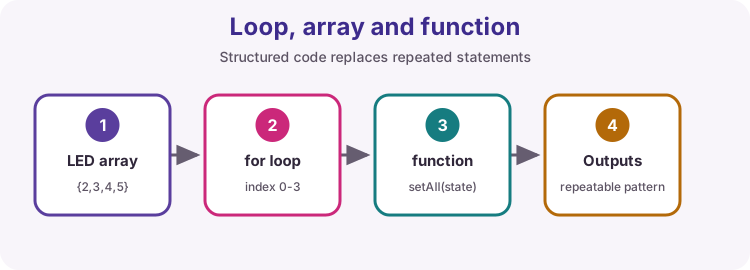
Why loops and functions matter
Copy-pasting the same digitalWrite four times works once - then a pin change means four edits and four chances to mistype. Loops walk a list. Arrays hold that list. Functions name a reusable task.
This lesson builds a four-LED chase, then a setAll helper, using those three tools together.
for loop anatomy
A for header has three parts separated by semicolons: initialisation, condition and update.
Initialisation runs once. The condition is tested before each body pass - if false, the loop ends. After the body, the update runs (often i++), then the condition is tested again.
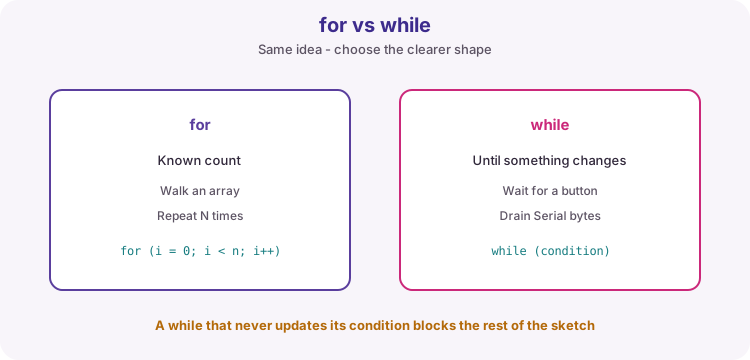
Use for when the count is known: walk every LED, repeat N times, scan an array.
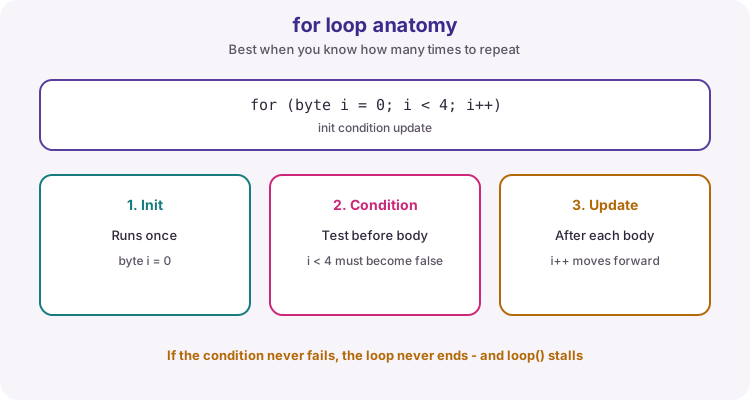
for (byte i = 0; i < ledCount; i++) {
  digitalWrite(leds[i], HIGH);
  delay(150);
  digitalWrite(leds[i], LOW);
}
while when you wait for a change
while (condition) { ... } repeats as long as the condition stays true. It suits waiting until a button releases, draining Serial bytes, or looping until a flag clears.
Danger: if nothing inside the body can make the condition false, the rest of loop() never runs. That is an infinite loop - fine for a deliberate hang demo, fatal in a multi-task sketch.
// Example idea - not in the worked sketch
while (digitalRead(buttonPin) == LOW) {
  // wait until released (blocks other work)
}
Arrays store related values
An array holds several values of the same type under one name. Indexing starts at zero: the first item is leds[0], not leds[1].
For four pins, valid indices are 0, 1, 2 and 3. Declaring const byte leds[] = {2, 3, 4, 5}; keeps pin numbers in one place.
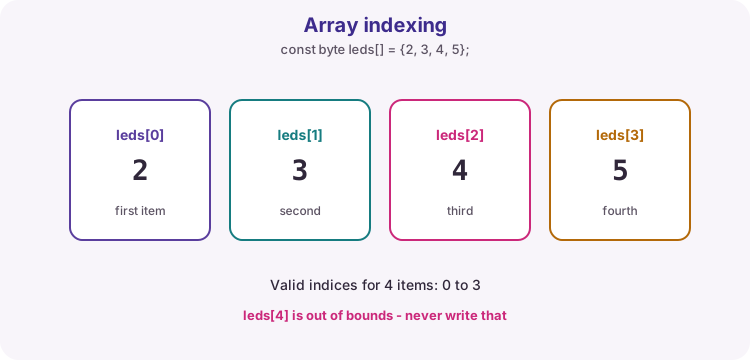
| Expression | Meaning |
|---|---|
| leds[0] | First pin (2) |
| leds[3] | Last pin (5) |
| ledCount | How many items (4) |
| leds[4] | Out of bounds - bug |
sizeof for length
Writing const byte ledCount = 4; works, but then you must update two places when you add a pin. sizeof(leds) / sizeof(leds[0]) computes the element count from the array itself.
Use that length in every for condition so the loop and the array stay matched.
const byte leds[] = {2, 3, 4, 5};
const byte ledCount = sizeof(leds) / sizeof(leds[0]);
The bounds trap
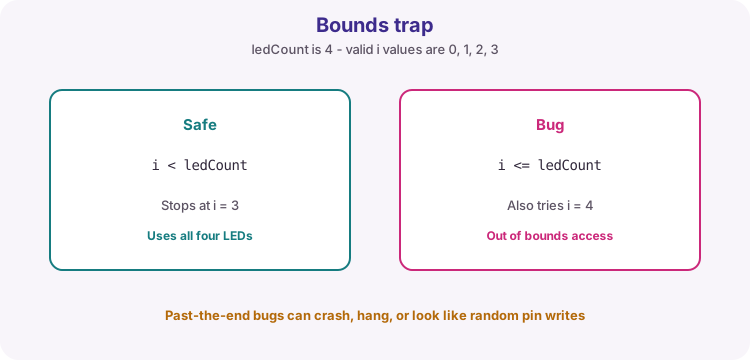
The classic off-by-one error is writing i <= ledCount instead of i < ledCount. With four LEDs that tries index 4 - memory that is not your array.
Symptoms look random: a wrong pin toggles, the board resets, or nothing obvious happens until later. Always ask: what is the last valid index?
Functions name a task
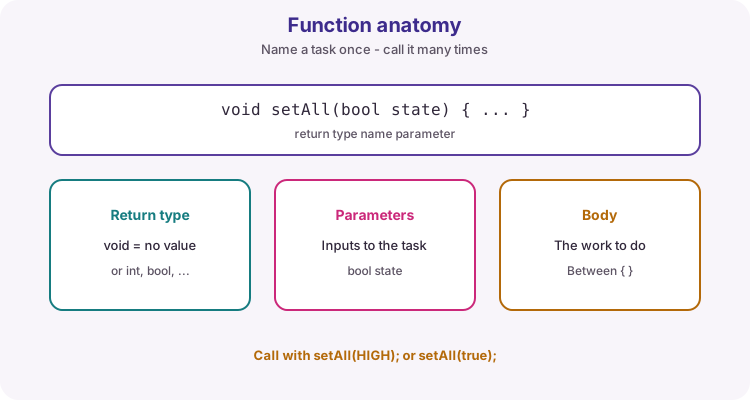
A function packages work behind a clear name. Parts: return type, name, parameter list, body.
void means the function does not return a value - it just performs an action. Parameters are inputs: setAll(bool state) receives the level to write to every LED.
Call it with setAll(HIGH); or setAll(LOW);. One change inside setAll updates every caller.
void setAll(bool state) {
  for (byte i = 0; i < ledCount; i++) {
    digitalWrite(leds[i], state);
  }
}
What the worked sketch practises
setup configures every pin in the array with a for loop. loop chases LEDs one by one, then calls setAll to flash them together.
delay is used for timing here so the pattern is easy to see. Later lessons replace long delays when several tasks must stay responsive.
Wiring and safe build sequence
- D2 -> 330 ohm -> LED anode; cathode -> GND
- D3 -> 330 ohm -> LED anode; cathode -> GND
- D4 -> 330 ohm -> LED anode; cathode -> GND
- D5 -> 330 ohm -> LED anode; cathode -> GND
- Confirm LED polarity: long leg is usually the anode
Worked sketch
Download .ino sketchconst byte leds[] = {2, 3, 4, 5};
const byte ledCount = sizeof(leds) / sizeof(leds[0]);
void setAll(bool state) {
for (byte i = 0; i < ledCount; i++) {
digitalWrite(leds[i], state);
}
}
void setup() {
for (byte i = 0; i < ledCount; i++) {
pinMode(leds[i], OUTPUT);
}
}
void loop() {
// Chase: one LED at a time
for (byte i = 0; i < ledCount; i++) {
digitalWrite(leds[i], HIGH);
delay(150);
digitalWrite(leds[i], LOW);
}
// All together via the helper function
setAll(HIGH);
delay(300);
setAll(LOW);
delay(300);
}How the code works
- sizeof expression calculates the array length instead of hard-coding 4.
- setAll receives one Boolean (or HIGH/LOW) and writes every pin in the array.
- Valid indices are 0 to ledCount - 1. Never use i <= ledCount.
- The chase for loop and setAll both share the same leds[] list.
Test and record evidence
Practical evidence checklist
Common faults and checks
- If only some LEDs work, check that LED's resistor and polarity first.
- An i <= ledCount condition accesses one item past the array - change it to i < ledCount.
- If the chase skips a pin, confirm the leds[] values match your wiring.
- Dim or dead LED: try swapping that LED with a known-good one.
Check your understanding
Q1. What are the three parts inside a for (...) header?
Show answer
Initialisation, condition and update.
Q2. What is the first array index?
Show answer
0.
Q3. Why is i <= ledCount dangerous for a 4-element array?
Show answer
It also uses index 4, which is outside the array.
Q4. What does void mean on a function?
Show answer
The function does not return a value - it only performs an action.
Q5. When is while a better fit than for?
Show answer
When you repeat until a condition changes, rather than a known count.